


Connect With Us
Visit Us
250 West Nyack Road, Suite #200 West Nyack, NY 10994
Get Directions
Call Us Toll Free
877-GO-RUSTY
877-467-8789
Telephone
845-369-6869
Fax
845-228-8177
Departments
Departments
Departments
SUBSCRIBE TO NEWSCONTACT US
One of RustyBrick's newest iPhone apps, Goldilocks and the Three Bears lets youngsters take advantage of the iPhone's touch screen with its 'press to speak' functionality. In both modes, anyone can tap a word to hear it spoken. In 'read to me' mode, the words are highlighted as the narrator reads them. How is this accomplished? With a little XML, we can make the iPhone very aware of where our words are, and let it know how to interact with them. Where do we get this XML? With a program called Soundbooth, part of the Adobe CS Suite, we can link data the iPhone can manipulate with sound a child can listen to and enjoy.
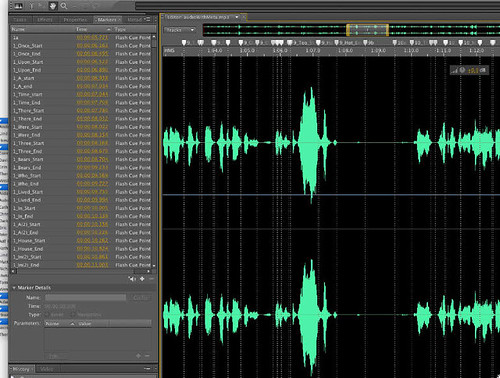
Looking at the screenshot above, you can see the wave form Soundbooth generated from our narration MP3. From here, we can use Soundbooth's 'Create Marker' function to drop in time markers for the words. Place a marker for the start and stop of every word, export the markers to an XML file, and you have the metadata needed to play and track each word in the program!
Of course, things aren't as easy as they sound. Even in a 20 page children's story, there are hundreds of words. Placing markers trying to find the exact time of the start and end is a very tedious. For Goldilocks, there are over a thousand markers per file.Then, there is the nature of human speech. Someone speaking at a normal pace tends to leave very little gap between words, making the placing of start and end markers between them come down to hundreths of a second. Place these markers wrong, and your program wont sync up with your audio.
The next problem is related again to the nuances of human speech. Look again at the above waveform. Most of the markers (the dotted vertical lines) fall in clear spaces between the green waves. Look at the far right, and see a line that is going almost down the middle. That one long wave is actually multiple words. Groups of words like 'Baby Bear' showed up in the waveform as one conjoined form. That makes the 'tap to repeat' functionality very hard to setup, unelss your boss is one step ahead of you.
Enter, sound file 2!
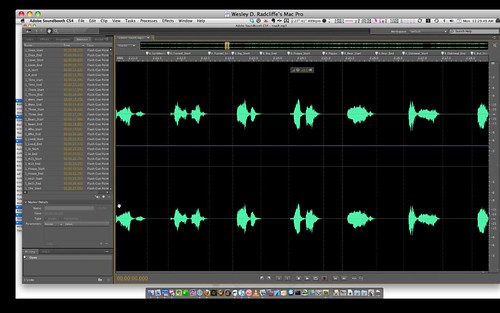
Look at all those beautifuly spaced waves (thank you Mrs. Schwartz!). Played straight through, they sound strange, but when played one word at a time, they're PERFECT for the tap to speak. Each word is pronounced clearly and correctly, without the inflection and speed that work in the original narration track. It was also slightly easier to mark this one up, as i didnt have to scrub as much to find the start and end periods.
The final interesting note is that when you scrub enough of these waveforms, you start to notice patterns. To the untrained eye, you may see two blobs below, but i clearly see 'bear' and 'oatmeal'.
.png)

Wesley joined RB after graduating from the Rochester Institute of Technology with a BS in Information Technology. In addition to building web solutions, he also assists in iPhone development.
This article is under Programming, iPhone
There is 1 comment for this post
250 West Nyack Road, Suite #200 West Nyack, NY 10994
Get Directions
877-GO-RUSTY
877-467-8789
845-369-6869
845-228-8177
1 COMMENT