Installing Security Video Cameras

Security Camera SystemAbout a month ago, we had a security breach at our office. Well, at least we thought we did - it turned out not to be a security issue, but rather a disgruntled guy from the cleaning crew.

In any event, we decided to buy a do-it-yourself (DIY) security camera system, which records and can be watched remotely, over the internet. We purchased a $300 system, on sale from Tiger Direct, made by Q-See. Over the past week or so, I have been punching holes in sheet rock and tracing through wires in the drop ceilings.

I am just about done setting it up. It was fairly easy to set up. The thing is, we need to return the DVR box, because one of the channels is broken. But I wanted to set up the cameras before I send the box back, so that when the new box comes in, I can just flip it on and plug in the cameras.

As you can see from the pictures below, it lets you plug in monitors, watch it over your iPhone and even on your PC. The cameras are small and the DVR box is small. I still cannot find a good Mac or PC program to view the cameras. But yet the iPhone has several FREE apps that view it fine. I don't get that, but whatever.

Here are some pictures:

Our messy closet, DVR box at the top:
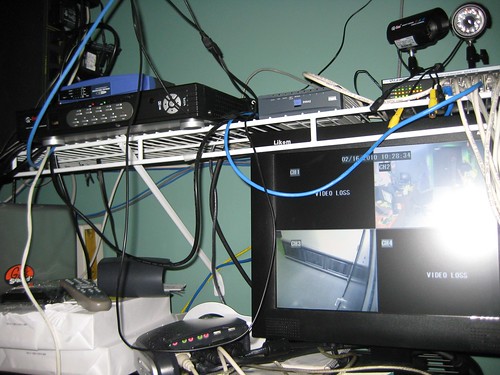
Security Camera System

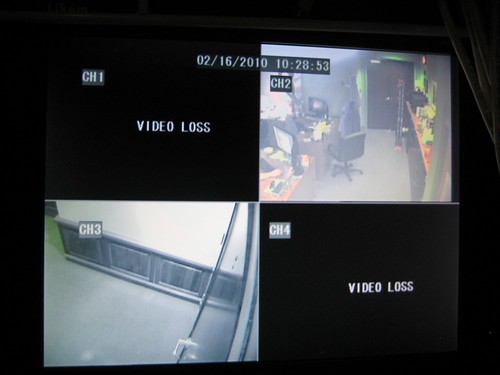
Two cameras on, on the PC monitor:
Security Camera System

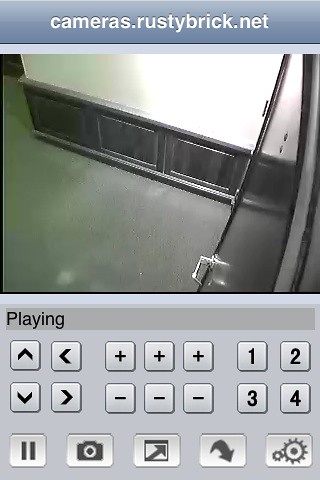
iPhone App viewer:
Security Camera System

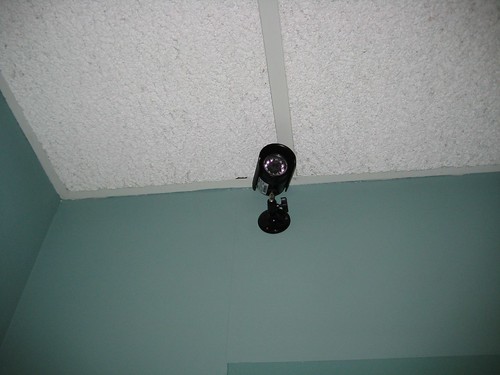
One mounted camera:
Security Camera System

Image credit

Bookmark and Share    
blog comments powered by Disqus

11 COMMENTS

posted by wireless camera system on: Sep 7, 2010 02:48pm

Great stuff. I really like your writing style.

posted by search engine for video on: Mar 18, 2010 11:16am

this is good site , i think there are more thought full idea!

posted by on: Feb 25, 2010 07:20pm

This type of installation is nice but not full proof... As a security installer with 10+ years of experience, I have noticed more than a few systems in clients business. The system looks easy to install but there is a lot more than goes into an effective camera installation, you need to protect your wiring and equipment from electrical spikes, vandalism and even rodent infestation (especially in NYC). You also need to choose the right camera for the right app, you choose an outdoor camera for indoor use, those cameras are meant to be mounted at least 20 feet from the floor. Any employee/vendor that comes in can "accidentally" hit the camera and change the viewing angle to look at the ceiling and then do the damage they planned. Also if you are looking to catch the cleaning crew (that have unrestricted access to your location) you should have installed hidden cameras without infrared because they will not be cleaning in the dark anyway. For more advise or questions, feel free to browse our company's website at www.360-protection.com or call us at 718-645-3655

posted by Executive Suites New York City on: Jun 3, 2010 07:13pm

Nice information. Its usefulness and significance is overwhelming the way you covered all the basic necessary information is really impressive, good work keep it up.

posted by khyati on: Jun 5, 2010 09:27am

Fantastic submit once again mate. I believe you’ve hit the nail about the head there. It does not ought to be challenging yet mose men and women fail to recognize the basics.

posted by Centrifugal Pumps on: Jun 15, 2010 10:08am

An integrated Access Control security system that provides client specific solutions for the best possible service in your specific location.

posted by Lorex Technology on: Mar 3, 2010 04:20pm

Edge wireless security dvr system comes with a 4 channel security dvr and 4 wireless security cameras. The dvr system uses the latest's compression technology(H.264) which lets you store more video footage using less hard drive space. You will be able to view and control your cameras using the remote software anytime, anywhere in the world, you can also view the cameras via an iPhone, iTouch and Windows phone. The wireless security cameras have a range up to 450FT and transmit a great video and audio signal. http://sylvaniastore.lorextechnology.com/product.aspx?id=2138

posted by Planet Chiropractic on: Feb 16, 2010 04:19pm

Good location for one of those cameras Barry may be in the closet nearby the DVR. Instead of mounting it up high, set it so the view is straight on for someone's face entering the closet. If someone is going to try and disable security that's likely where they will end up. Also think about mounting the DVR ( if that's where your video gets saved) in a way that makes it very difficult to remove. Lastly, think about a way to backup data off-site in an automated fashion. Security cameras can be fun.

posted by Barry Schwartz on: Feb 16, 2010 04:31pm

Yea, so this isn't the final set up. I don't think I can mount the cameras that low. But I can configure the system to send me alerts to my phone with pictures, if triggering certain events. Lots of neat settings I can set up here. Looking forward to playing more.

posted by Sue Heilbronner on: Feb 17, 2010 05:13pm

Hey. Neat. This brings vendor management to a whole new level... Looking forward to our feed with cams trained squarely on joe and michael. Plus it will be really helpful to know if either of other of them is spending some or all of the day in the closet! :)

posted by Barry Schwartz on: Feb 17, 2010 09:16pm

We can mount these cameras to their heads, so you can watch which site they are coding at all times. :)