


Connect With Us
Visit Us
250 West Nyack Road, Suite #200 West Nyack, NY 10994
Get Directions
Call Us Toll Free
877-GO-RUSTY
877-467-8789
Telephone
845-369-6869
Fax
845-228-8177
Departments
Departments
Departments
SUBSCRIBE TO NEWSCONTACT US
Last Updated: 2/27/2004
The bottom line for any marketing endeavor is return on investment (ROI). Search Engine Optimization (SEO) has its place within a company's online advertising budget. Rankings are only a means to an end. Most SEO campaigns produce a positive impact on ROI. Web analytics software gives you the necessary data to make informed decisions regarding your online marketing efforts.
This article will discuss Urchin's Web analytics software and how it can benefit a Search Engine Optimizer and their client's bottom-line.
- Overview of Important Web Analytic Features for the SEO
- Detailed Review of Urchin 5.5 and Campaign Tracking Module
- Administrative Configuration
- Reporting Review
- Campaign Tracking Module
- SEO's Wish List to Urchin Developers & Web Analytics Companies
- Concept of Goal Based Funnel Analysis
- Web Analytics Article Wrap Up
Most Web analytics software are able to report on fundamental statistics such as visitors, hits, page views, bytes, top pages, entrance pages, exit pages, referrals, search engine keywords, browser and computer types and more. This information empowers a search engine marketer with basic information on how well his/her site is performing. Urchin 5.5 takes this one step further. Through the use of 1st party cookies, they provide additional details as to the nature of your Web visitor.
How visitors discover your site is as important as the action the visitor takes after reaching your site. Referrals, the technical term for how a Web visitor comes to locate your site, is one of the areas that SEOs track on regular basis. Referral information is able to give you data on where the user came from, such as a search engine, affiliate, article or no referral at all. In addition, this information can be broken down into which search engines brought you the traffic to you and which keywords the searcher typed in to find your Web pages.
As a marketer, you need not only focus on how the Web visitor arrives at your Web pages but perhaps more importantly what the Web visitor does after they land on your page of interest. I challenge you to take a look at your log files. I can guarantee that most of your Web visitors hit your pages and their most likely next action is to leave your site. One goal you should set immediately after reading this sentence is to reduce that exit rate! Even by just a small percentage. Keep that visitor on your site! Web analytics software can help you monitor all of this with ease. Set up one goal per page and make sure to increase the success rate of that goal on a weekly basis. The goal can be a purchase, add to cart, download a pdf, fill out a form or call a special 800 number - it can be any action that you want the user to take once they hit that page. Monitoring your micro goals will make the difference in your bottom-line.
With Urchin's 1st party cookies, which they named "Urchin Tracking Module" (UTM), you can track these goals easily. In addition, you can track the number of times a visitor comes back to that page and the length of time it takes a specific user to reach a goal. I will explain all of this information in detail as you read on. The point is that Urchin gives us data that can be used to increase our client's ROI. Urchin goes beyond any other Web analytics program I have ever used and it is affordable.The remainder of this article will go through detailed screen shots of the Search Engine Roundtable Weblog's log files and tracking through Urchin. Although the Weblog does not have e-commerce capabilities, I will try to explain what you will see if the e-commerce module was activated. For an overview of Urchin's features please visit Urchin's feature list at http://www.urchin.com/products/feature_list_master.html.
As mentioned above I will be taking you through a week's time period of The Search Engine Roundtable Weblog's Web traffic through the eyes of Urchin 5.5. The first part of this detailed review is the administrative configuration of the Urchin Web Analytics suite. The second part will be the reporting review of the Urchin 5.5 Software. Open up a bag of popcorn and enjoy this slideshow format as you continue on.
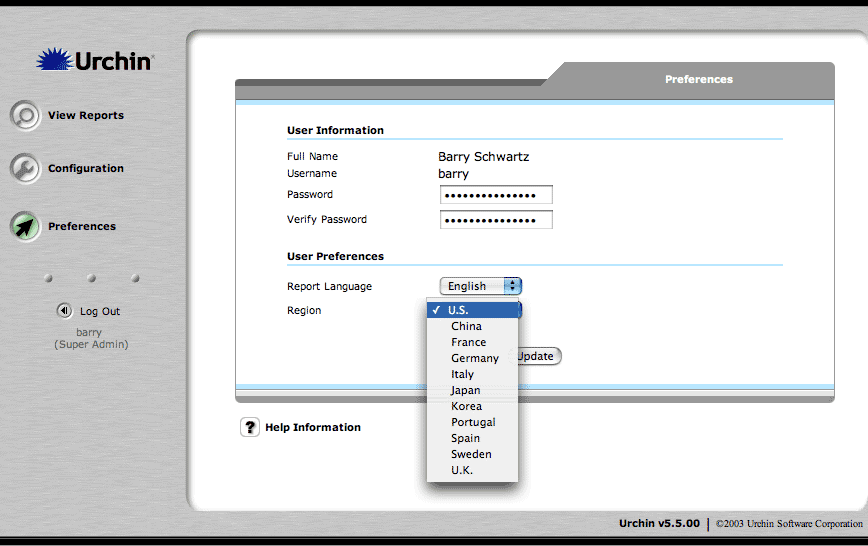
Installing Urchin is really easy. It took me no time to install their free 15-day demo. After installing the software on my server, I logged in and set up my clients with access to their Web statistics. The screen you see below is the "Preferences" screen that allows me to change my password and more.
You May Click on ALL Pictures to Enlarge in New Window
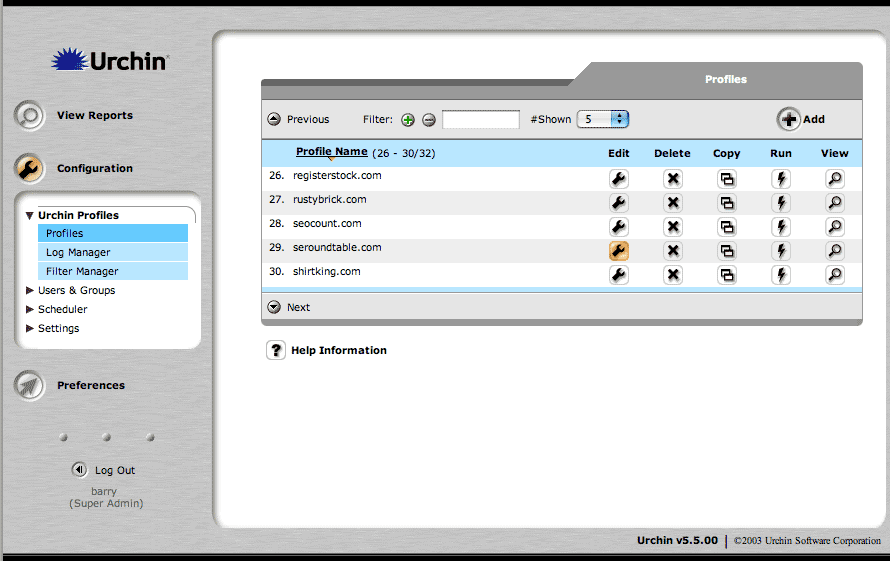
After setting up my preferences I was able to configure the settings for the domain seroundtable.com. I clicked on "Edit" on the "Configuration, Profiles" page.
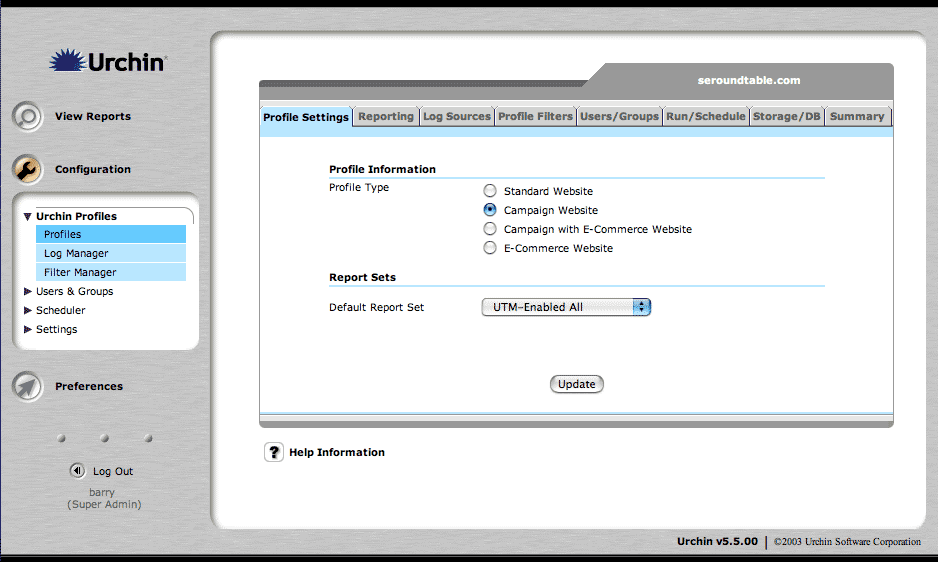
Urchin allows you to configure each report with different options. For example, seroundtable.com has no e-commerce functions, so I easily removed those reporting features from the reports by selecting the "Campaign Website" profile type. Some of my customers have different profile types because they either don't have e-commerce or campaign tracking or both. This GUI (Graphical User Interface) makes it easy to manage all your reports in one area.
Each report is individually configurable by the "Super Administrator." Below you will see the screen that gives me the ability to modify criteria such as the number of levels in a users path stream that Urchin will track (by default this number is set to 3). All the way at the bottom you will see an option for "Primary Goal Match". With Urchin's Campaign Tracking Module, you are able to specify one or many goals for your site and track response rates to those goals. With seroundtable.com, the only goal I set up was if a visitor added a comment or not. The page to add a comment (at the time of writing this article) was seroundtable.com/mt-comments.cgi. Each time a user went to that URL, Urchin marked that there was successful goal completion. Repeat visitors were tracked and recorded as well.

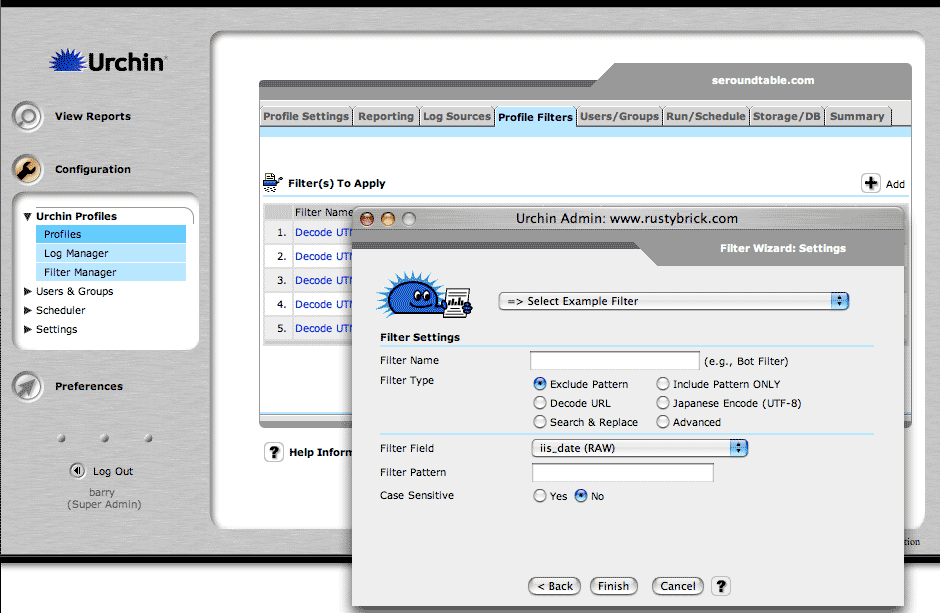
For many reasons, it is important to have the ability to add filters to the log files reporting. Urchin makes this easy. You simply go to the report profile that you would like to set up a filter for, and click on the "Profile Filters" tab. Urchin has pre-defined filters that you can choose from or you can make your own custom filter with the filter wizard. This comes in handy when you want to make two reports for the same domain.
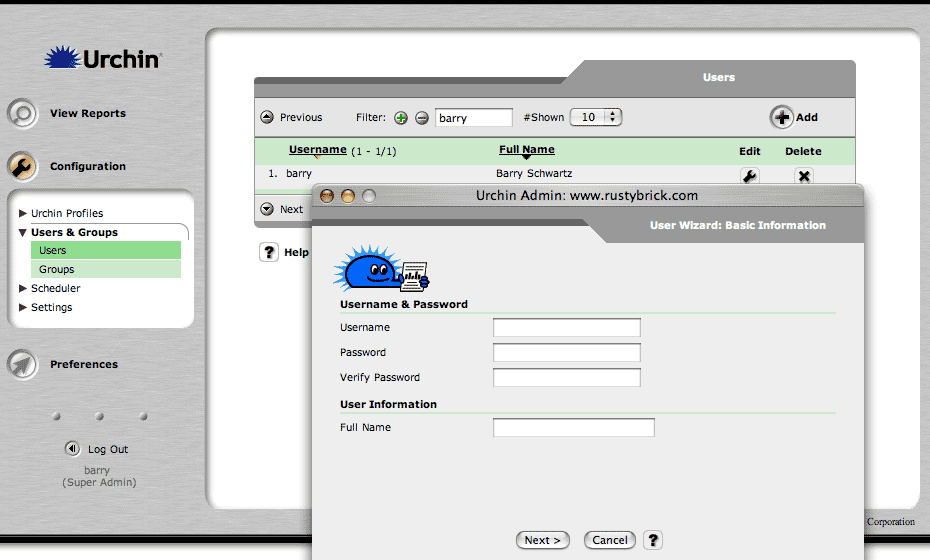
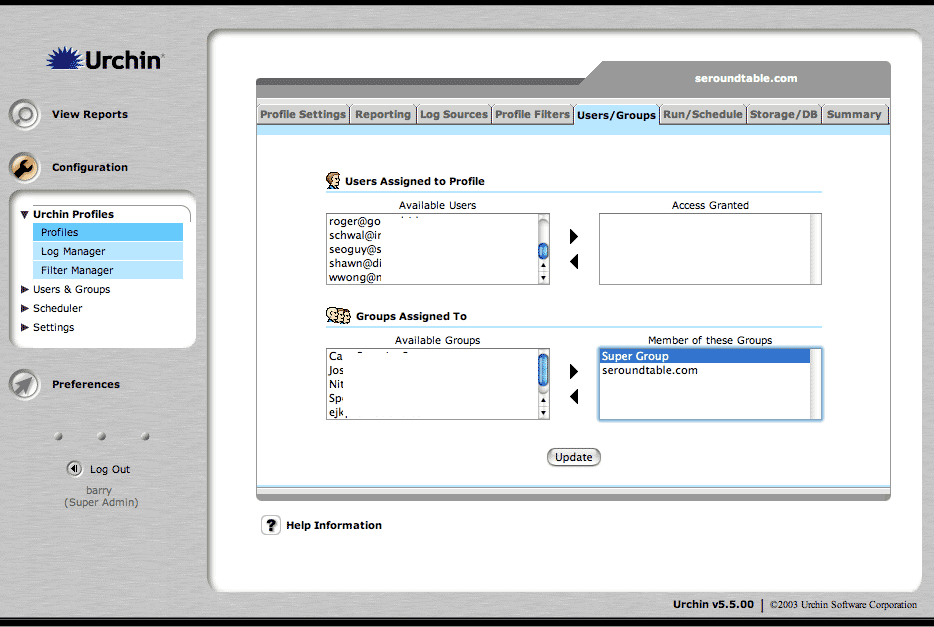
In addition, it is really easy to give multiple people access to one or more reports. With the use of the User Wizard, Urchin gives you the ability to quickly add users so that they can access their reports. As you can see below, you simply select which users are part of which group and then specify which groups have what access to specific reports. Urchin provides a very easy and logical method of setting up user and group access to reports.
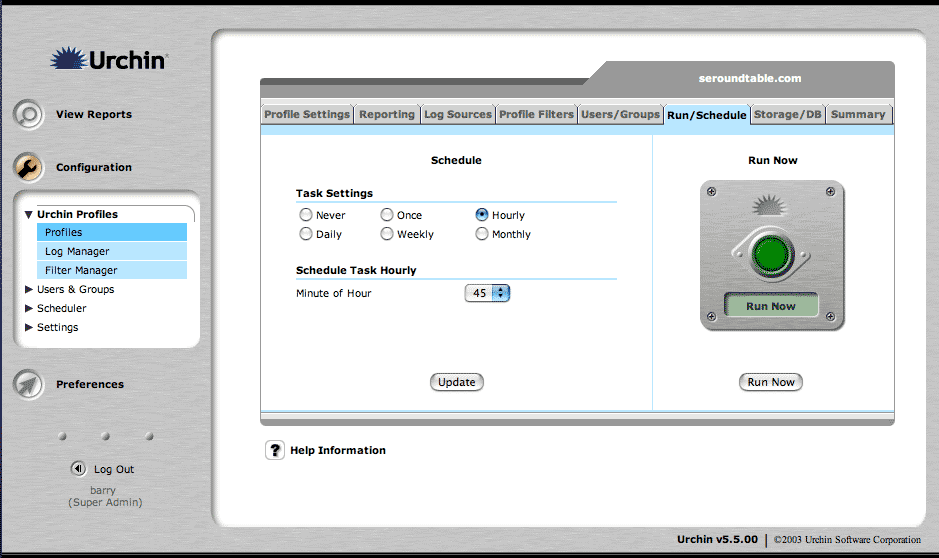
Within the configuration section of the module, you can easily specify how often you would like to run each report. For seroundtable.com, I have selected a schedule that runs the update of the reports every hour, 45 minutes past the hour. Urchin can process huge log files in exceptionally quickly. Older versions of Urchin used to take significantly longer but with Urchin 5.5, running a report takes seconds.
That covers the first part of the detailed Urchin review - the set up and configuration component. More information on installing and configuring Urchin to your liking is available at Urchin's Web site and via the Urchin customer service line. The next section will discuss in detail the available reporting features.
One of the best attributes of Urchin has always been its ease of use. Urchin has always provided easy to read and understand reports and charts. I have seen many Web analytics programs that require a lot of interpretation and explanation to my clients. By having an easy to use and understand interface, the time required to explain reports can be reduced greatly.
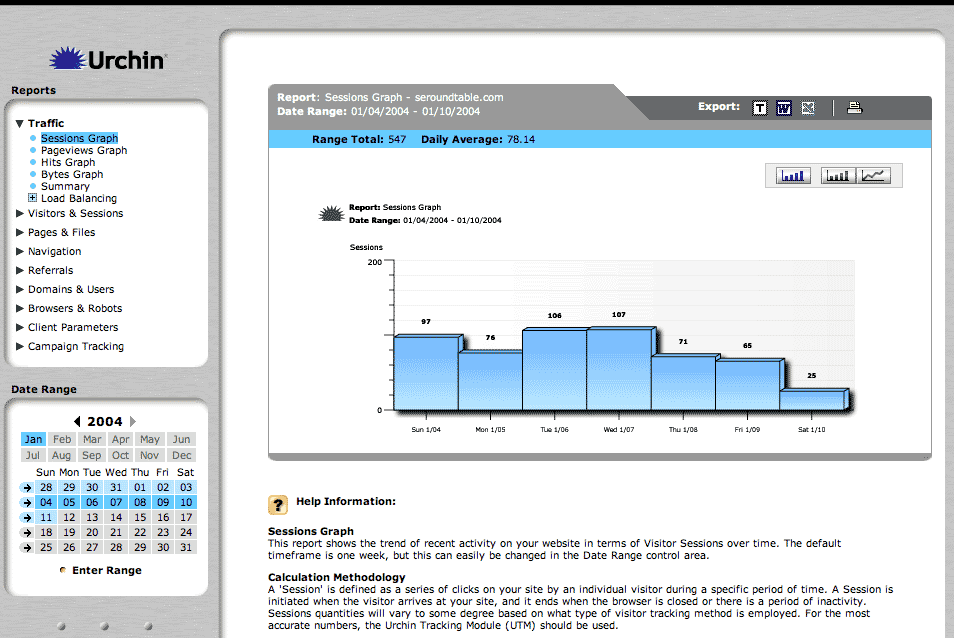
As mentioned previously, reports remain restricted and can only be accessed with the use of a user name and password by logging in to the Urchin report module. The first screen that loads is the Traffic/Sessions Graph. This graph gives you a quick overview of the number of sessions over the week's period. Urchin defines a session as follows:
A Session is a defined quantity of visitor interaction with a website. The definition will vary depending on how visitors are tracked. Some common visitor tracking methods and corresponding session definitions are: IP-based Visitor Tracking, IP+User Agent Visitor Tracking and Unique Visitor Tracking (cookie-based, such as Urchin's UTM). For a more detailed explanation please visit http://help.urchin.com/doc/glossary.cgi#S
The data range can be changed at the bottom left corner of any report. You also have the option to click on the bars to make them "explode" or to change the bar graph to a line graph. They use a technology developed by Adobe named SVG, which helps make these reports more interactive and attractive. In addition, every report view gives you these SVG options and export options, which include export to text, Microsoft Word and Microsoft Excel.
You May Click on ALL Pictures to Enlarge in New Window
The next screen shot displays a similar graph. But. The information that is graphed is the "Pageviews" for that week. Urchin defines a Pageview as follows:
"A page is defined as any file or content delivered by a web server that would generally be considered a web document. This includes HTML pages (.html, .htm, .shtml), script-generated pages (.cgi, .asp, .cfm, etc.), and plain-text pages. It also includes sound files (.wav, .aiff, etc.), video files (.mov, etc.), and other non-document files. Only image files (.jpeg, .gif, .png), JavaScript (.js) and style sheets (.css) are excluded from this definition. Each time a file defined as a page is served, a pageview is registered by Urchin."
As you can see below, I have selected the line graph mode for this pageview graph.
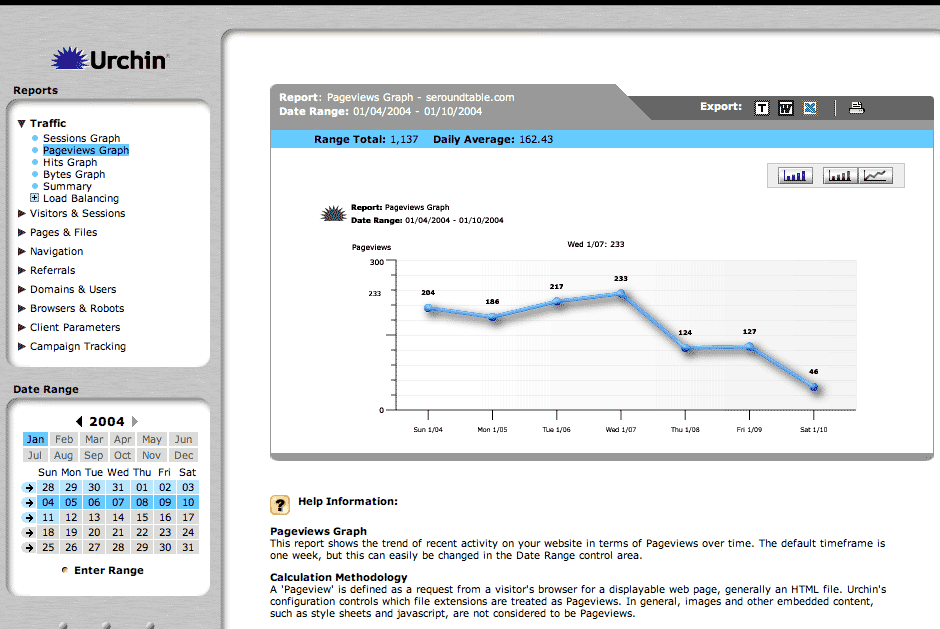
Urchin allows you to view not only the sessions and pageview reports they also give you the ability to view a hits graph, bytes graph and even a load balancer graph. In addition, Urchin gives you a data summary of all of these graphs on one page at the "Summary" link. That completes the traffic analysis portion of the Urchin Web analytics suite.
We will now move on to the "Visitors and Sessions" reporting section. The first report shown is the "Visitors by Day" graph. This graph has all the features of the other graphs but provides an additional level of detail. As you can see, there are orange and green colors on the bar graphs. The orange, represents the first time unique visitors and the green represents the prior unique visitors. You can click on the green part of a bar and it will tell you the exact number of prior unique visitors that visited that day. Urchin tracks this information with a 1st party cookie.
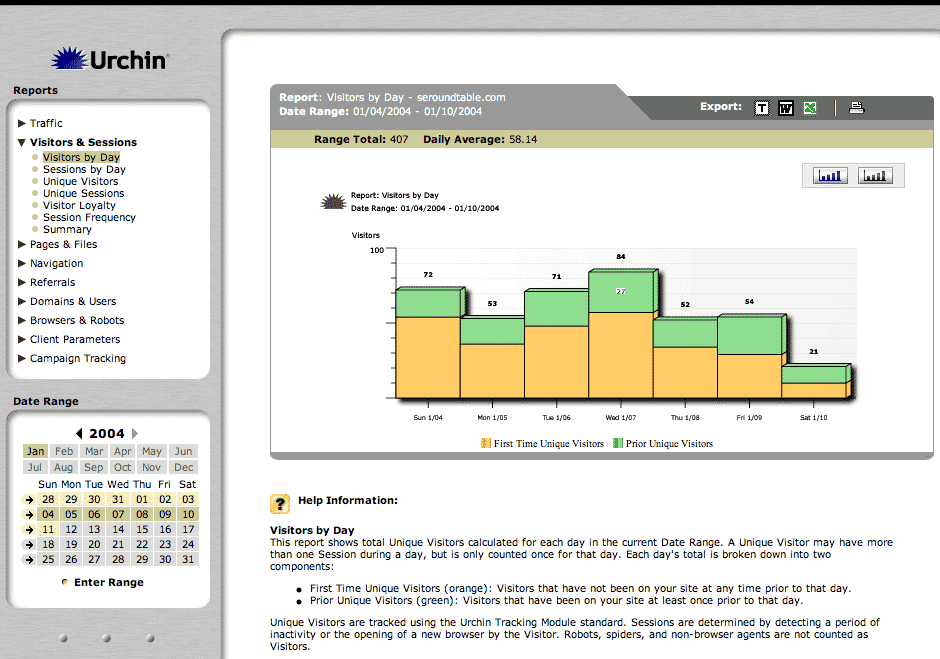
Urchin gives you the ability to view this information both by "Visitor", as shown in this screen shot as well as by "Session". The next screen shot you will see is termed "Unique Sessions." Keep in mind that there is also a "Unique Visitors" graph that does the same thing but with different data points. The unique sessions graph can be charted as a bar graph or pie chart. I have selected the pie chart for this report. This report gives you the percentage of initial sessions, versus repeat sessions over that data range period. You can actually click on the piece of the chart to make it stand out, like an exploding affect. You will see examples of this later on.

Another interesting report in the visitors and sessions section of Urchin is the "Visitor Loyalty" graph. This report helps you understand the loyalty factor of your Web visitors. The more loyal your visitors (the more sessions per unique cookie) the higher the bar graphs will be on the right side. There is a similar report named "Session Frequency" which provides this information in a different light. All reports have their own individual purpose.

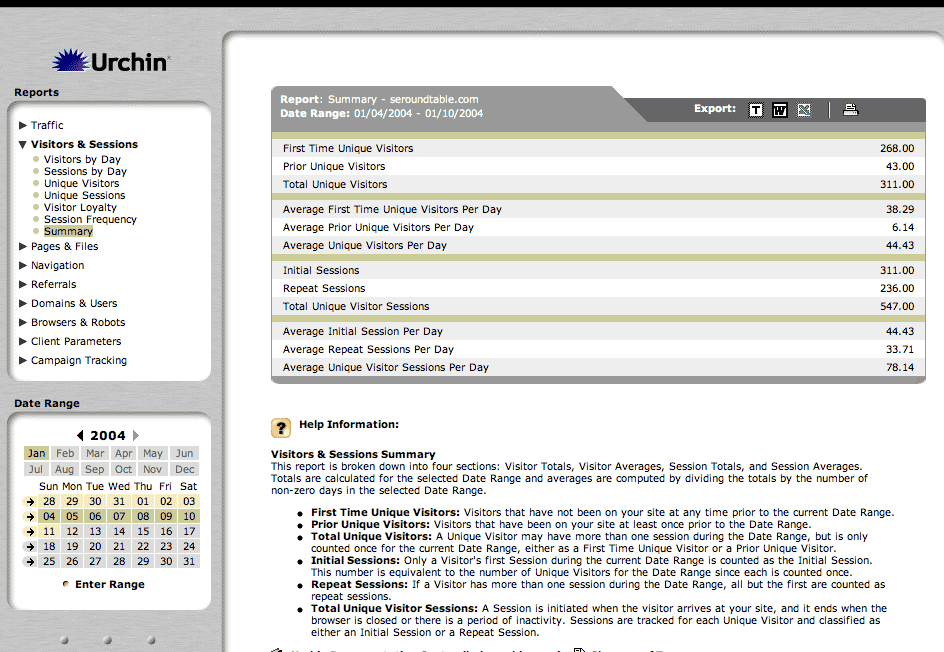
This final screen shot displays the visitors and sessions summary overview. It provides the user with the ability to see summarized numbers of the above graphs in an organized and efficient layout. I cannot stress how important it is to display this information in an intuitive manner. Urchin has done an excellent job in this respect! The format comprises consistent navigation on the left, date range information at the top and bottom left. The data you want is right in the middle, and the help is customized per report under the graph and/or data.
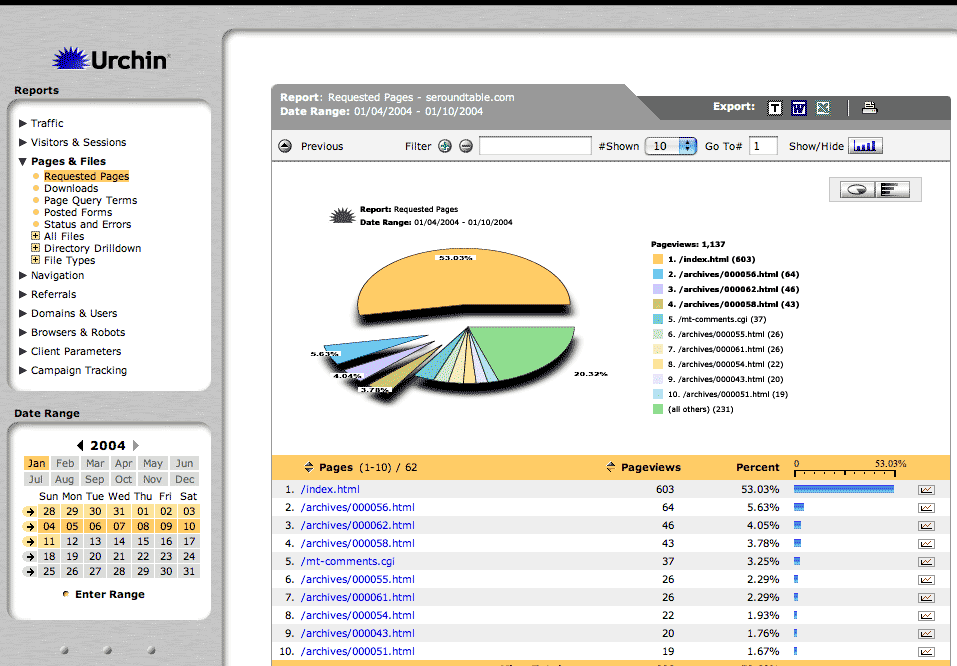
We can now move on to the "Pages and File" section of the reporting module. You can see that the first report option is "Requested Pages." This report tells you the most frequently requested pages by your Web visitors. Most often the top page is your homepage but that is not always the case. On many other sites, the top page is a page that does well in search engines and people just go to that page directly from the engine. In this graph I have clicked on pieces of the pie to show you the explode effect. In addition you can see the page name as data below the graph and if you want more information, simply click on the little graph icon to the right of the data and you will be provided with the same data on a day-to-day basis.
Urchin gives you graphs and data for downloads requested, page query terms placed, and posted forms conducted as well.
Another important report is your "Status and Errors" report. Documenting the errors and statuses that are occurring on your site gives you the ability to implement changes and improve on bad error codes.
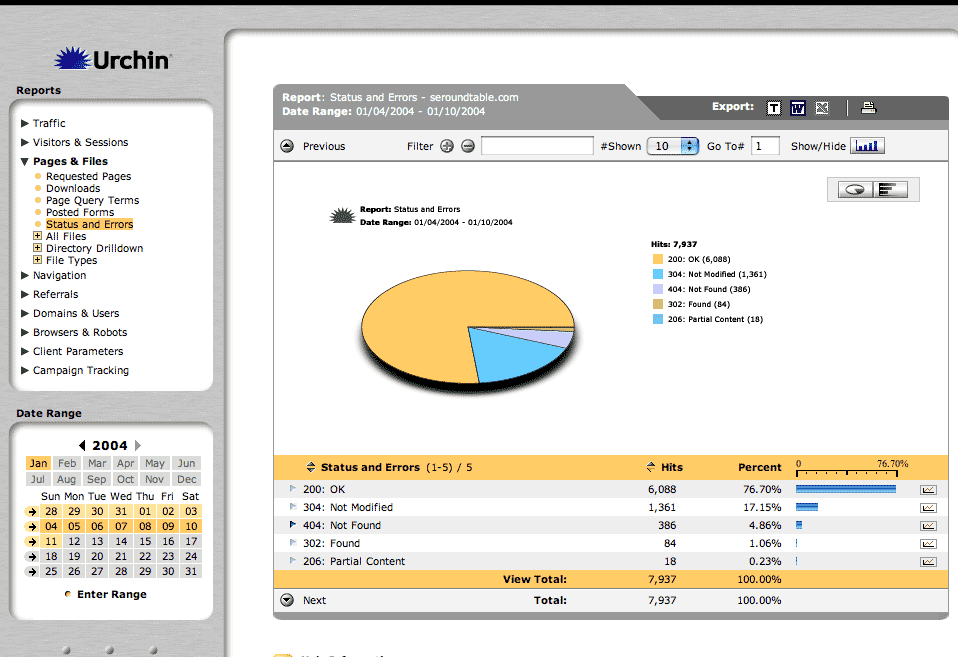
That now takes us to the section that reports on how your Web visitors are navigating throughout your Web site. I consider this section to be the most interesting and possibly the most valuable section of the basic Urchin module. If you can understand your users click patterns and see where they are dropping off, then you can implement changes to those pages and increase your conversion rates.
The first report within the navigation section is the "Entrance Pages" report. Where are people entering your site most? Most of the time, your top entrance page will be your homepage. But if you rank well for a specific keyword term and that keyword term takes you to an inside page, then you will see that page at the top of your entrance page. You want your top entrance pages to be the conduit to the pages or products you want your customers to visit. Use your top entrance pages well by putting links in visible areas to where you want them to go.
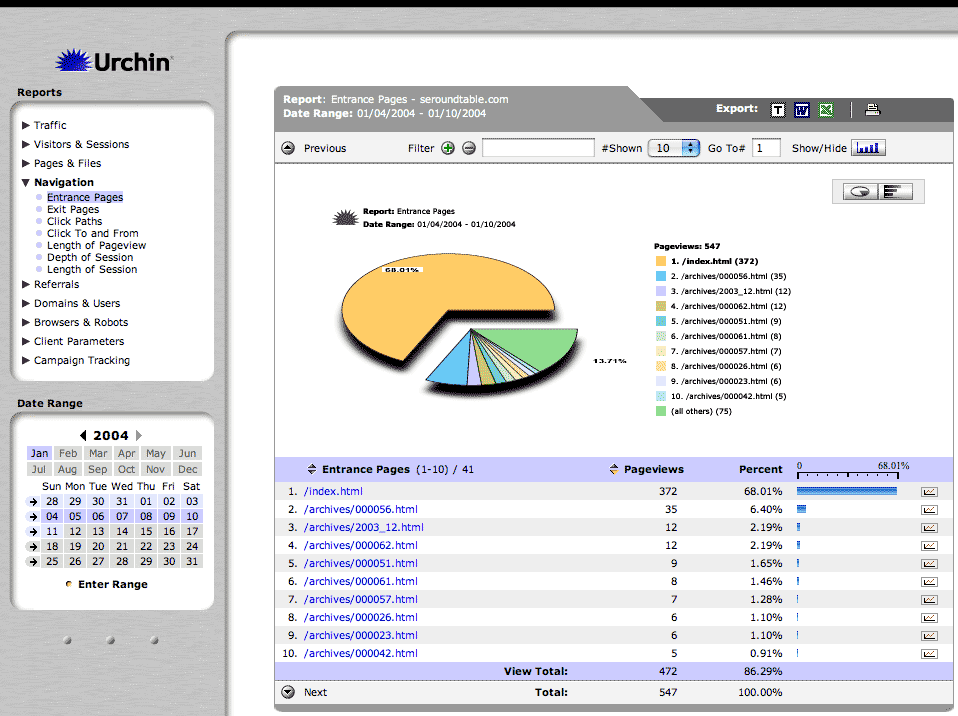
Statistically, your top entrance page will be your top exit page. Your goal will be to lower the ratio of exits to entrances for the page, to the smallest possible number. By adding "call to actions" on your top entrance pages, you can entice your Web visitor to make another click. Anything you can do to encourage that next click will be a victory for you. Later on, I will be discussing the Campaign Tracking Module (CTM). In the CTM discussion, I will be covering a lot of these concepts in detail.
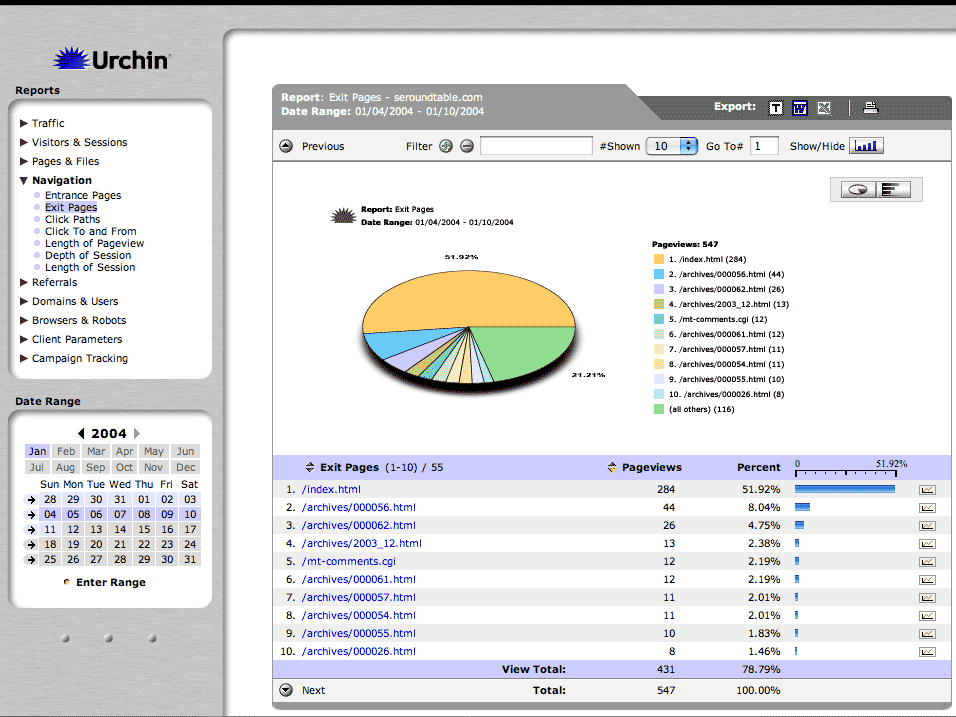
Urchin gives you a number of ways to view your user's actions on your Web site. The next screen shot displays the "Click Paths" of the Web visitor. The most popular click paths are displayed first. You can then go deeper and deeper to see the least likely click paths of your user.

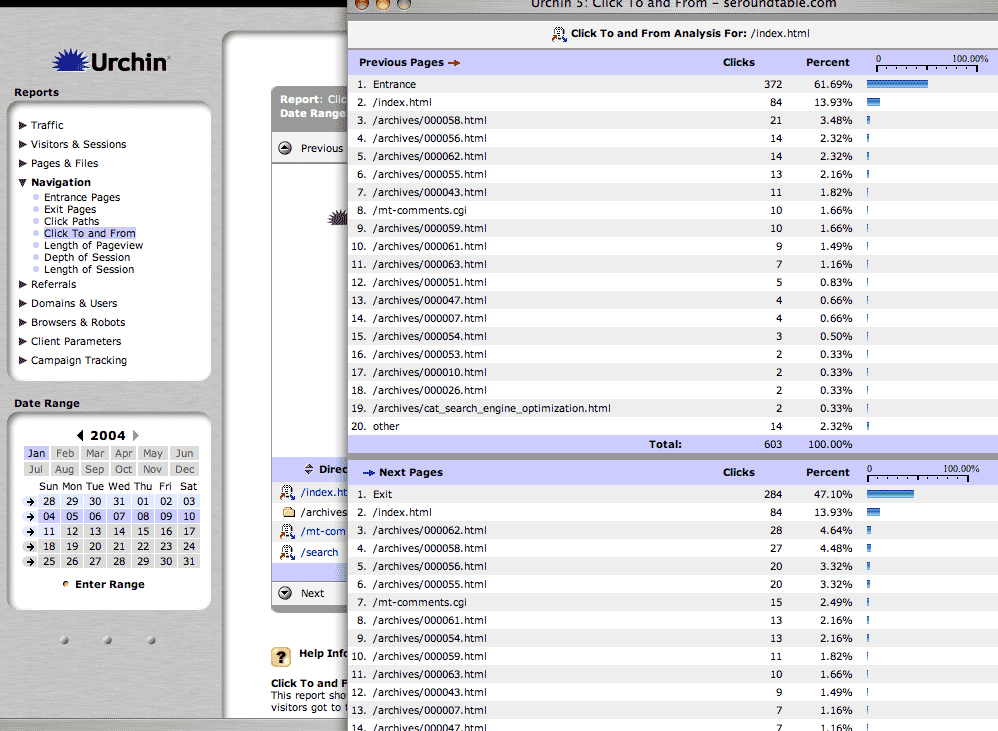
Urchin recently added a new report named "Click To and From" that gives you the patterns of how the user got to one page and went to the next page. For example, if you want to see how people are getting to your homepage you click on the little arrow icon and it pops open the window in the screen shot. It shows that most people just enter the homepage from their browser. Yet, the second most active way to get to the homepage is by actually refreshing the homepage. In addition, you can see what the person is most likely to do after they get to that page. In our example, most people simply exit the site. About 13% refresh the page and others view blog details.
The length of a pageview is an important statistic because you might want to see if people are actually reading the content on your pages versus clicking around without finding what they are looking for. The longer the pageview can mean a number of things, such as they have found what they are looking for and they are reading the content. It is important to take advantage of these pages as well and try to encourage a response from the user. This will help increase your success factor of your pages.
The depth of a users session can also provide meaningful insight into your Web site's navigation and design. With a Weblog, you will not see a deep click path. However, in regard to "rich content and product" sites, you will want to see a user go deep into your site. All usability and conversion specialists recommend to keep the click count (the number of clicks required to make a purchase) down to a minimum, many say 3 clicks is a good number. This report enables you to gauge this metric and make adjustments to your site to increase conversion rates and the usability of your Web site.
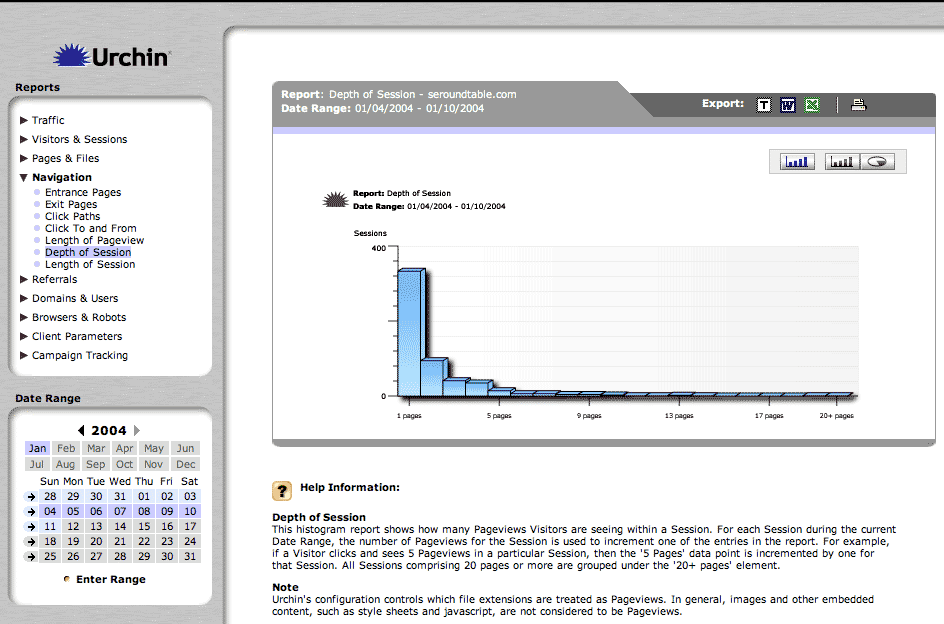
In addition to the depth of a session, Urchin gives you the ability to track the length of time per session that they are staying on your site. Depending on the site's purpose you will want the numbers to be higher or lower. This report gives you the answers you need to make informed decisions about your site's and page's layout and architecture.
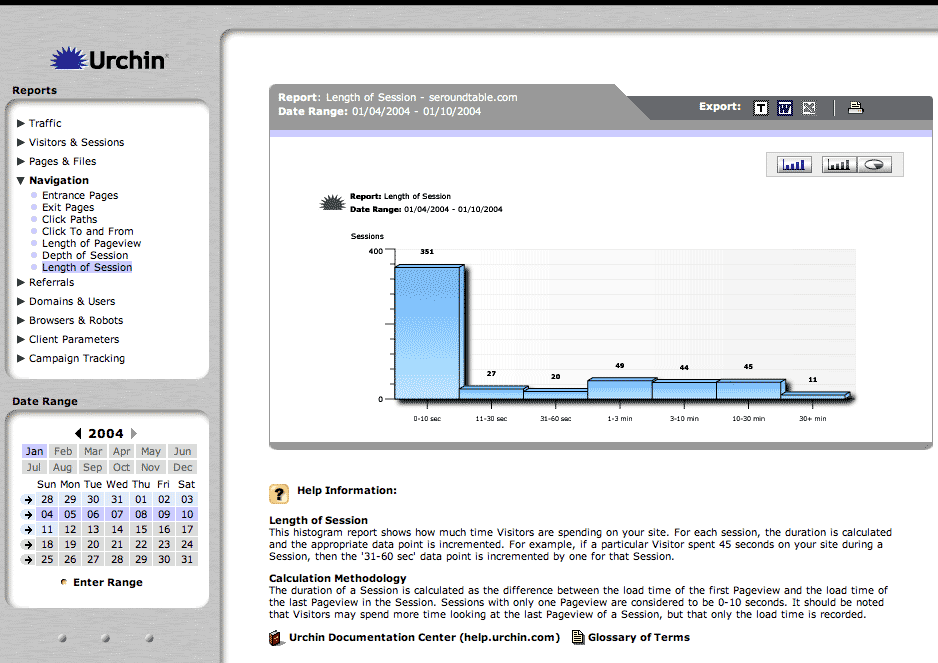
That covers the navigation section of the basic Urchin module. Navigation patterns and behavior is a critical metric that must be measured for every serious Web site. If you are not currently measuring these metrics then you are walking in the dark. As mentioned above, I will be discussing the Campaign Tracking Module (CTM), which expands on many of these concepts.
Referrals, is the next major reporting section in the Urchin module. Referrals are a search engine optimizers dream statistic. Urchin does an excellent job summarizing and reporting on all types of referrals from direct hits, search engine driven traffic, directory driven traffic, and other referral driven traffic.
The screen shot displays the referrals ordered by most frequent. This is an easy way to see how the majority of your visitors are getting to your site. Some sites get all of their traffic from one place, whereas others get their traffic from many places. It is important to track referrals to see where traffic is coming from and where it is not coming from. Then you will be able to adjust your linking campaigns accordingly.
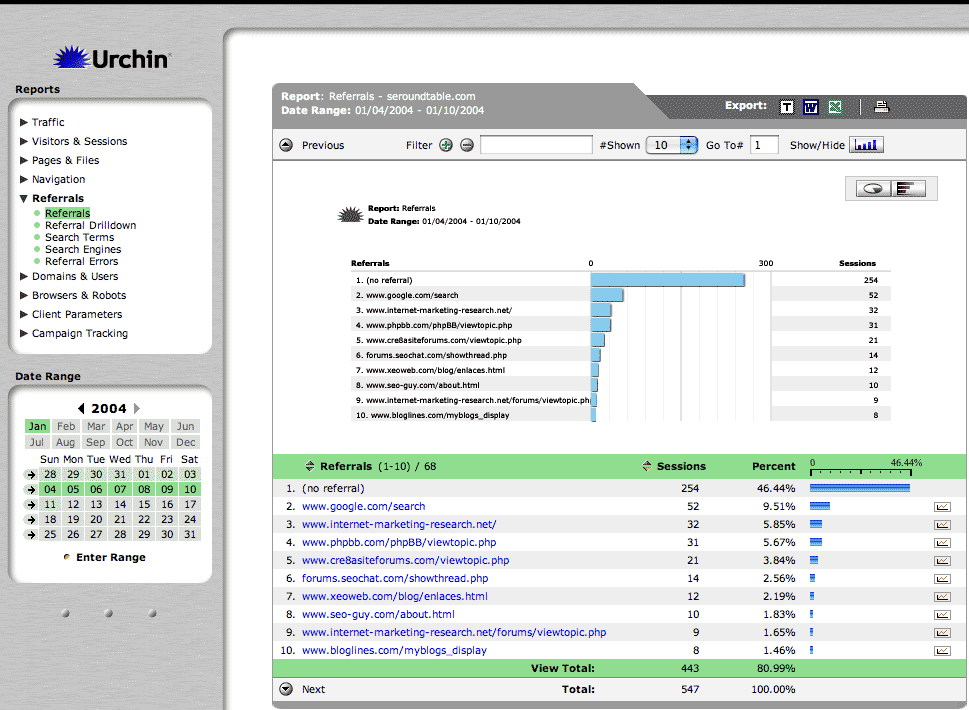
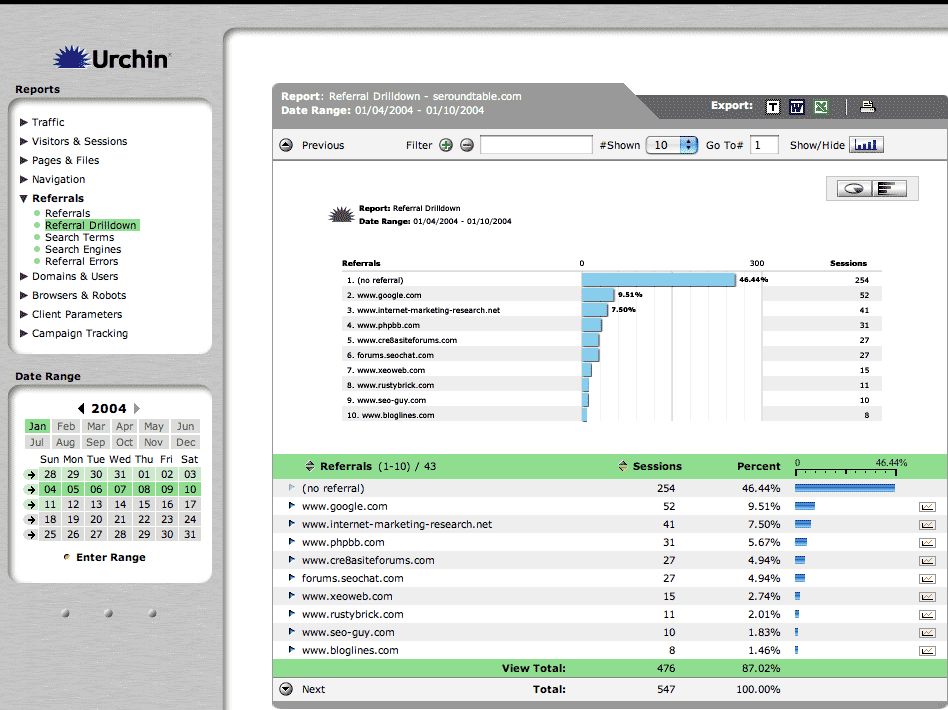
The next report, named "Referral Drilldown", groups the referrals by domain name. This is helpful to summarize which Web sites bring you the most traffic as a whole. This report differs from the report just mentioned above. The report above lists the pages that refer traffic to your site as compared to this report that lists the sites that refer traffic to your site. Pages are defined as individual html documents within a site, whereas a site contains multiple pages.
The next report named "Search Terms" report provides data on what keywords people are entering in to the search engines to find your site. This report is not grouped or filtered by a specific search engine. It is just a quick and easy way to see which search terms bring in traffic to your site. It is important to track this information in order to be able to change your keyword strategy for better quality keywords. Quality keywords are essential in order to bring relevant traffic to your site. If your keywords are unrelated to the service/product that your business offers then you are just wasting money on your monthly bandwidth bill.
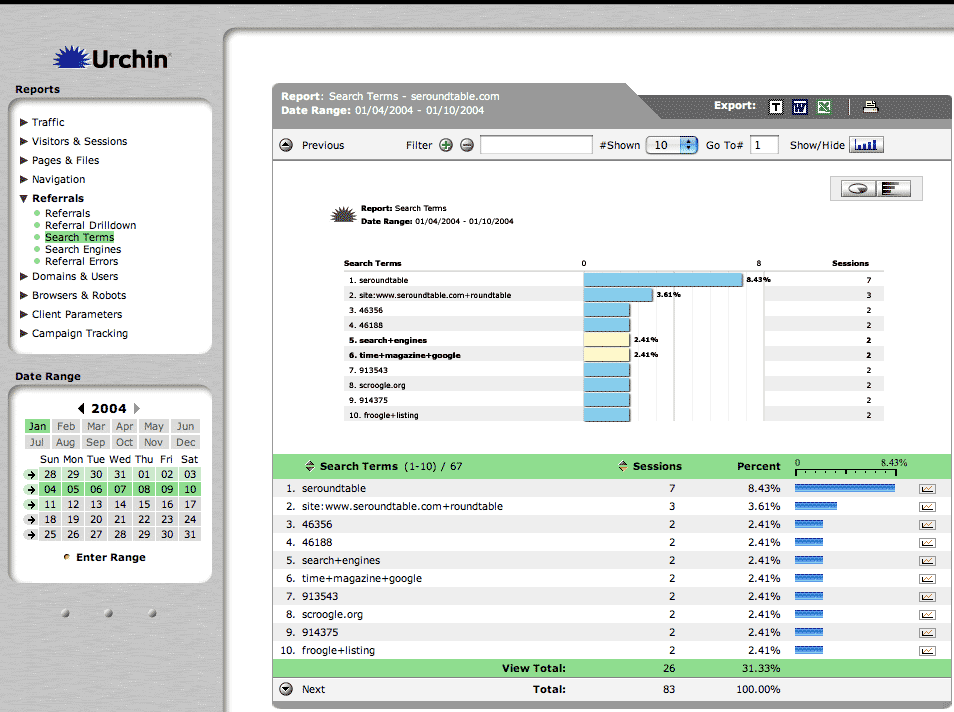
The "Search Engine" report gives you a break down according to search engine. Firstly, it tells you which engines bring you the most traffic. Secondly, by clicking on the arrow for more information, it tells you which keywords are bringing in traffic for that specific engine. It is important to see which engines are driving traffic to your site. Based on what market share those search engines currently have, your traffic should be somewhat the same. If they are greatly skewed then you know your keyword optimization for certain engines are poor. For example, let us say Google has 30% market share, Yahoo! has 40% market share, and AskJeeves has 10% market share. It would be nice to see that 30% of your search engine driven traffic comes from Google, 40% from Yahoo! and 10% from AskJeeves. If the percentages look more like 40%, 40% and 1% then you know something is wrong. You will need to look at Teoma's engine (AskJeeves is powered by Teoma) and see what you can do to improve your rankings. AskJeeves also has more paid listings on a page then most search engines, so that is a factor as well. Yahoo! plans on switching its organic results from Google to Inktomi within the next month or two, will your site do well with the Inktomi engine powering Yahoo!? This is all-important information that can be derived from this report and other reports in Urchin.

That wraps up one of the most interesting sections of the Urchin reporting tool, referrals. Referrals detail how people are getting to your site, what keywords they query the search engines with, and which engines drive the most traffic to your site.
The next section discusses the domains and users, a section I personally do not spend much time analyzing. The domains report gives you the ability to track, which ISPs are providing the traffic to your site. Basically, this report tells you how many people are using AOL or another Internet Service Provider (ISP) as their Internet connection to visit your site. This does come in handy if you want to build a site that requires high-speed connections, which requires your user to have a high-speed ISP.
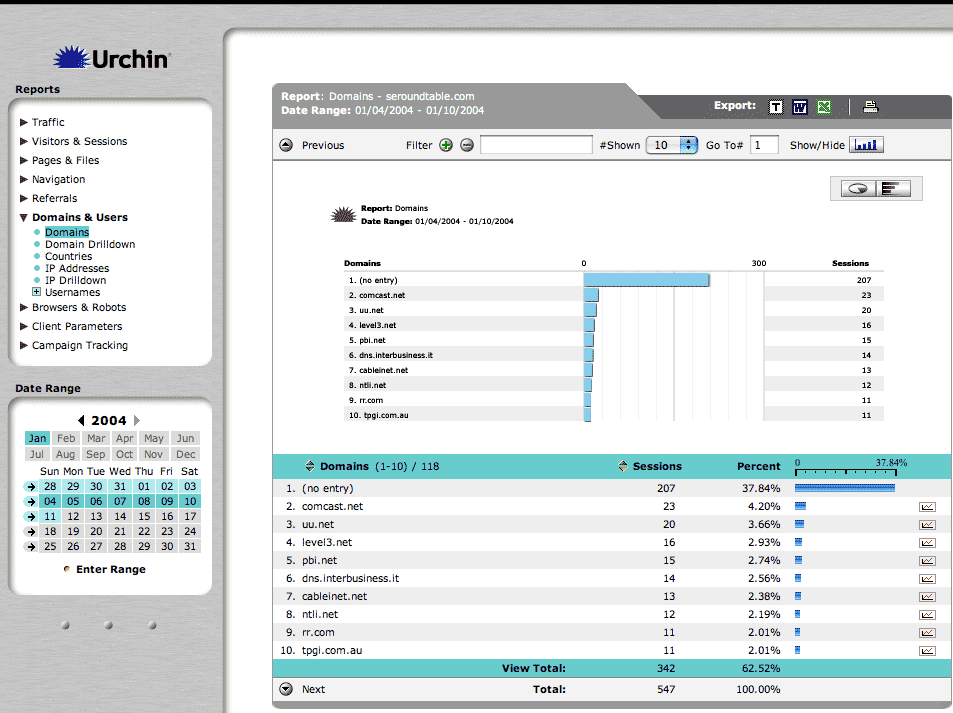
The "Countries" report details what geographic location your user is coming from. This statistics is very useful for large International sites and content sites. One major reason why one would track this information is to know if they should possibly offer the content on their site in multiple languages. If most of your traffic comes from the United States, then you should update your site's content based on that countries traffic patterns. In addition, your content should be United States focused and appeal to that cultural group.

The next report is named "IP Addresses." It gives you a break down of the most frequent sessions by IP address. Further more you can click on the IP address and Urchin will do a reverse lookup on the IP address to give you more information on that user. So when you find out your "friendly competitor" has been chewing up all your bandwidth by creating a robot that downloads all your product graphics, you can send that competitor a note or simply ban that IP address.
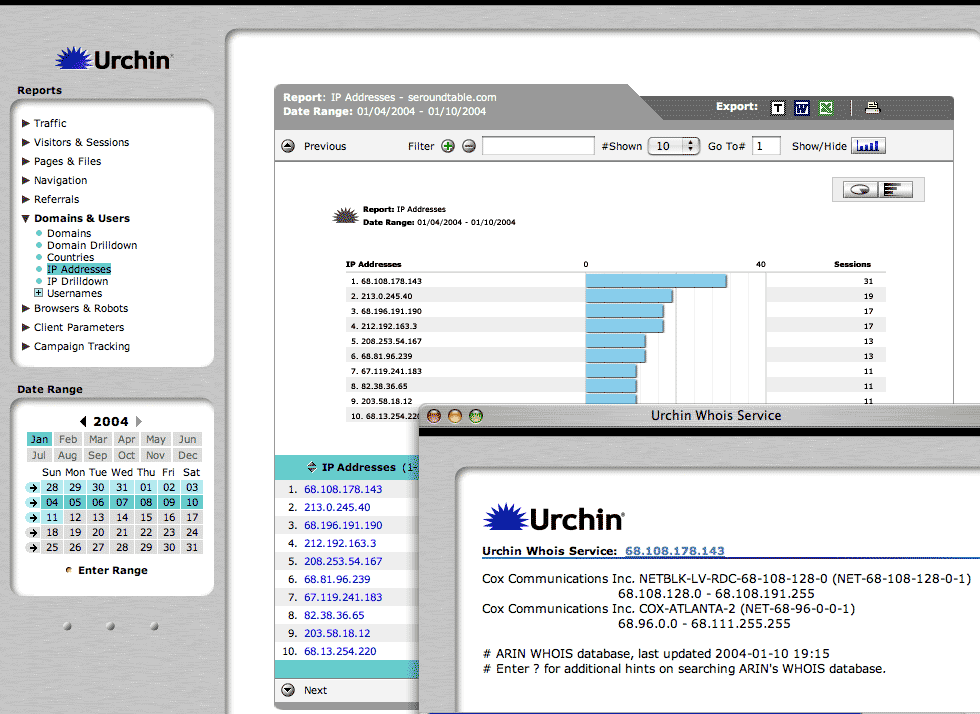
That sums up the "Domains and Users" section of the Urchin reporting module. The "Domains and Users" section allows you to track the ISPs and Countries that visit your site. In addition you can drill down into a users IP address and conduct a reverse IP lookup. One thing I did not cover was the username reporting, which is a simple report of the length and time a user logged into your Web site.
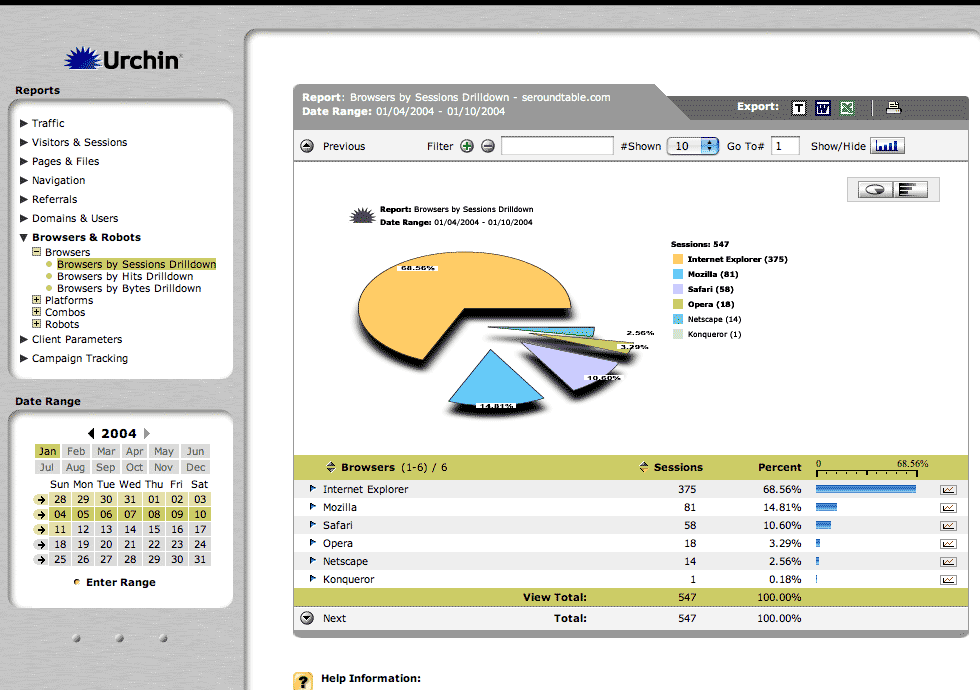
Another useful section of the reporting module is the "Browsers and Robots" section. This section gives you information on the type of browsers and computers your visitors are using to visit your site. In addition this section also gives you information about the different robots visiting your site. This report is named Browsers and it tells you which browser the visitors are using. From Internet Explorer, Mozilla, Netscape, Opera and the new Apple browser Safari. Web sites work differently on different browsers. It is therefore important to make your Web pages compatible with most of the available browsers. Which browsers, will depend on what you see in this report. Urchin also gives you the ability to drill down into a browser to see which version of that browser people are using. As most of you know, Web pages also work differently with the same browser but a different version.
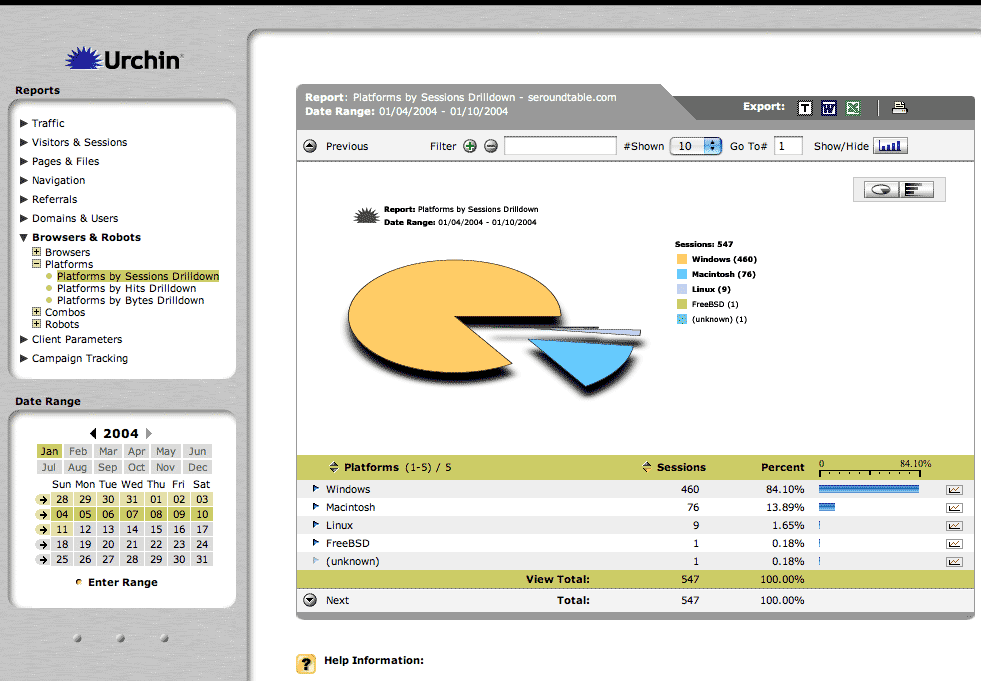
The "Platforms" report provides information on the type of operating system the person is using to visit your site. This report drills down into the version of the operating system as well. And yes, Web pages work differently on different operating systems.
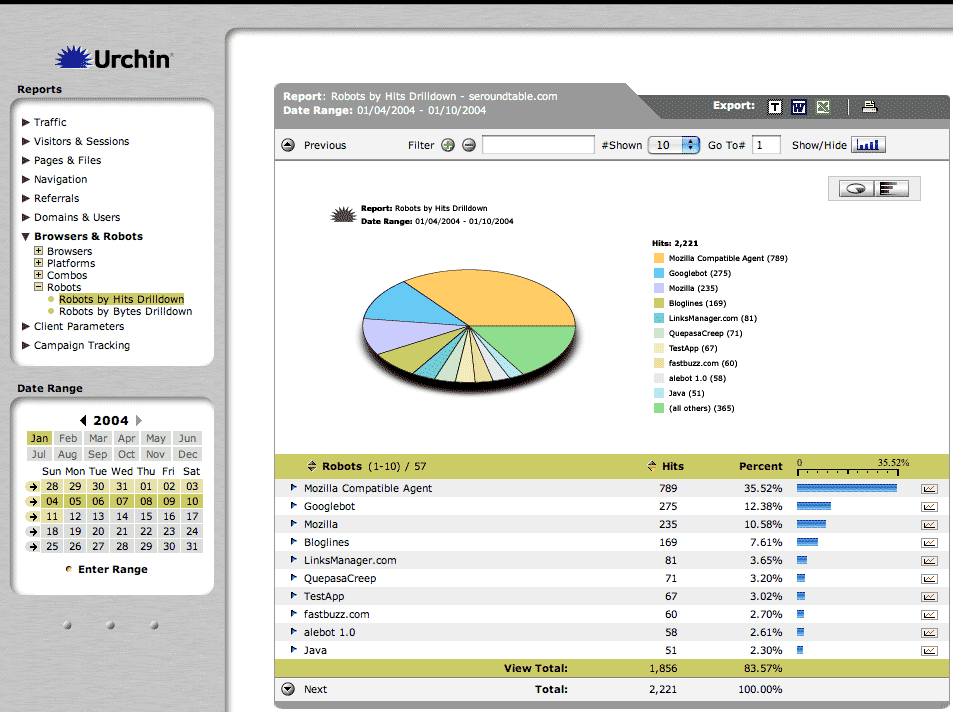
A fun and useful report for search engine optimizers is this "Robots" report. It summarizes which "robots" or "spiders" visit your site. SEO's use this report to ensure that the engines are visiting your site. If any robots are missing then you know you need to get them to visit your site some way and some how. In addition you can see which bots are most active. This report does not go into detail of which pages of your site the robots visited. There are plenty of free tools out on the Internet that can provide this detail, one is SpyderTrax by the founder of SEO Chat and can be downloaded at http://www.darrinward.com/.
That concludes the "Browsers and Robots" section of the Urchin Reporting Module. The next section is the last module included in the base Urchin license and it is called the "Client Parameters" report. The Client Parameters report requires that you place the UTM code on each of the page headers of your site. This allows Urchin to report on such attributes as screen resolution, screen colors, languages, Java, Time zones and JavaScript version information.
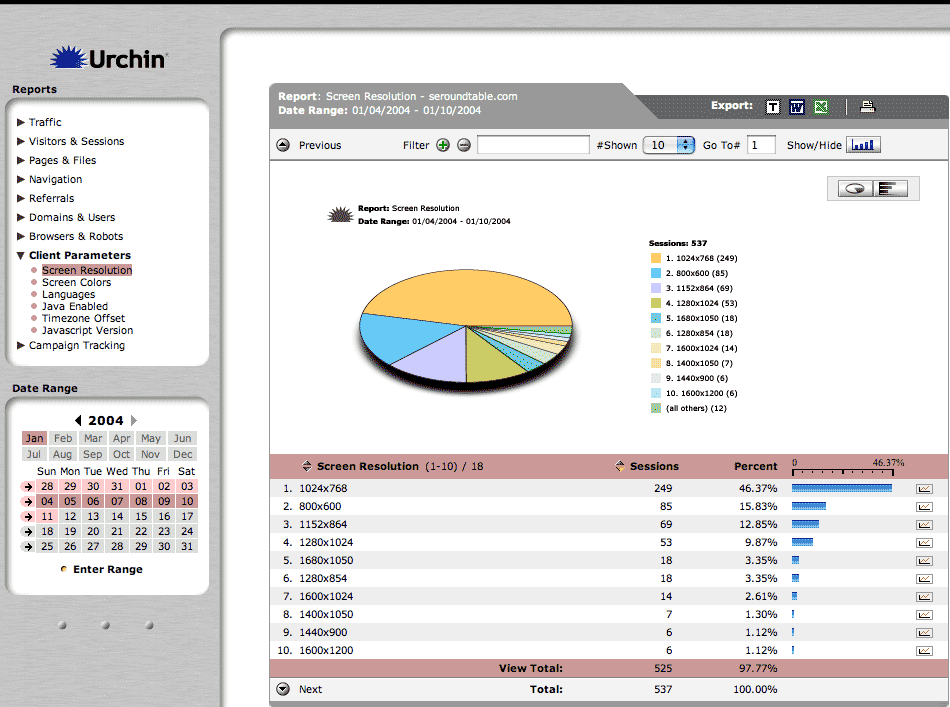
The first report you see below is the screen resolution report. How often do you ask yourself, if I was to do a redesign what size screen should the layout conform to? Most people just go with the standard 800X600 resolution. Yet, with this tool you are able to be able to be more creative.
The "Screen Colors" report is a nifty report that tells you whether your visitors have a 1 bit to 32 bit screen color settings. The languages report details the browser and computer language set by your Web site visitors, which helps you answer the question, should I make my content available in other languages? The Java Enabled report tells you the percentage of visitors that have Java enabled. The time zone report gives you information as to the visitor's time zone settings and the JavaScript report tells you the JavaScript version information.
That covers all the reporting available within the base Urchin license. It is powerful, easy to use and extremely useful information. The next reporting section discusses the new Urchin Campaign Tracking Module (CTM). I have not yet used all the features within this module but the CTM can be an incredible asset for any Web business looking to increase conversion rates through the use of metrics. The CTM is powerful enough to breakdown by sub campaign how well you are doing in dollars and in goal conversions. So if you do an email campaign you can track how well the different links in the email campaign convert. In addition you can track organic and paid search engine traffic and so much more.
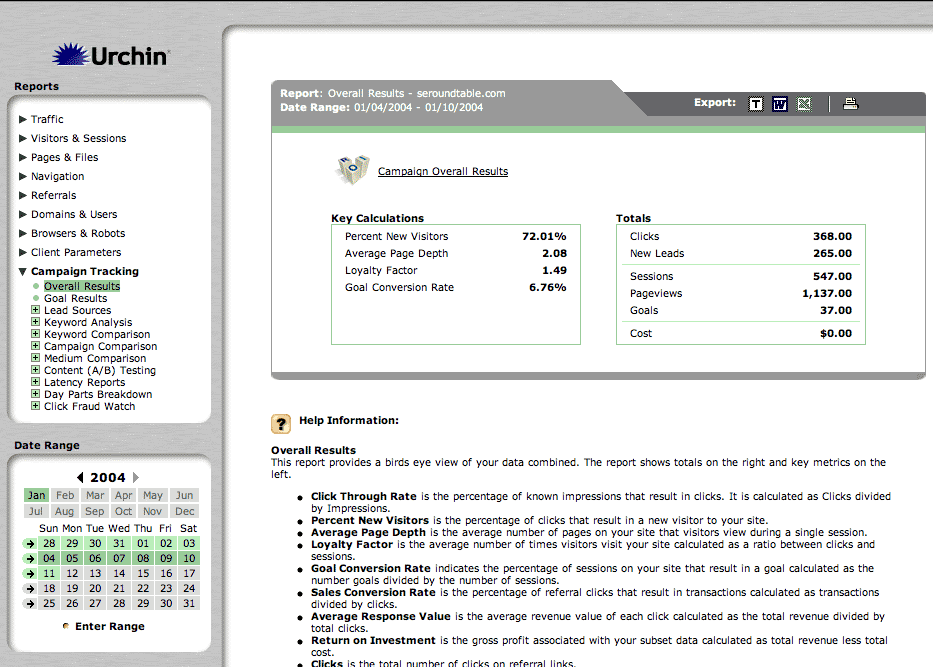
The screen below is the Campaign Tracking Module's Overview, which gives you an idea of how successful your campaigns are within a specified time period. The campaign tracking on the Search Engine Roundtable Weblog is not set up to work with the e-commerce module. If it were, there would be information on sales conversion rates, average response value, return on investment and overall transactions as well as revenue and cost figures. The report below gives you a summary and overview of what is contained within the module.
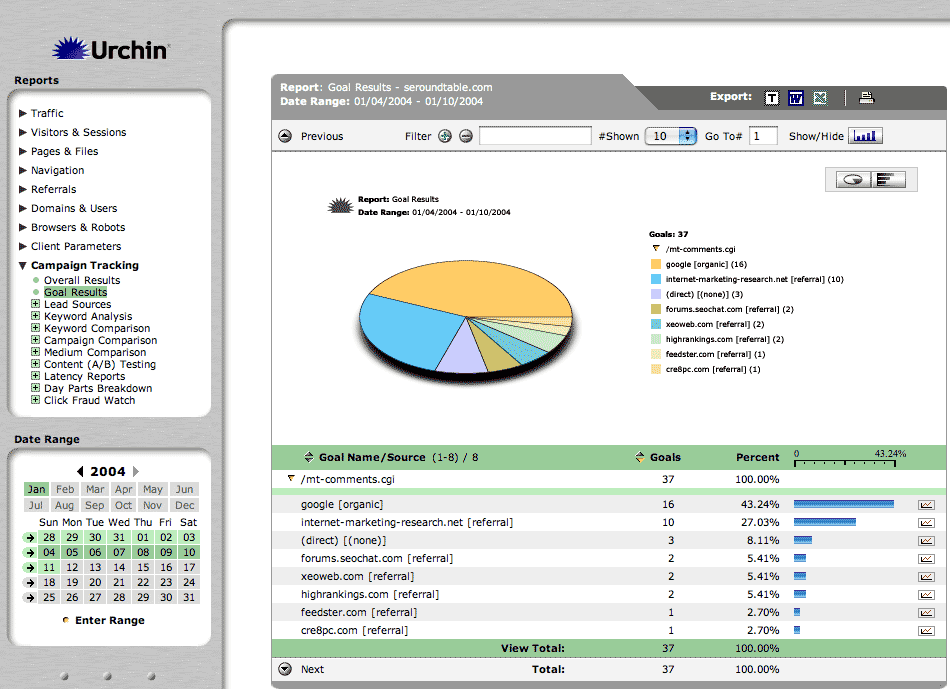
The next screen is named "Goal Results." Here you have the ability to track how successful you are in accomplishing your goals on your Web site. A goal can be a click, a form submission, a procedure or something else. In my example, I set a goal to be each time someone clicked on the comments link in the blog. By clicking on the arrow to the left of the goal, you can see which sources of traffic bring you to the leading amount of goal completions. This figure gives you the ability to treat one traffic source with more care then another traffic source, or to supplement the word "care" with "dollars".
I will now venture to the "Lead Sources" section of the CTM and click on "Acquisition". You will see that each section within the CTM has subsections of acquisition, quality, conversion and cost breakdown. Each of these sections provides a different look at the data, helping you make the most informed decisions about your traffic. The acquisition subsection of Lead Sources gives you a break down of lead source by click, impressions, new leads, click through rates and percentage of new leads. You can then click on the information to break down the details even further by Lead Source.

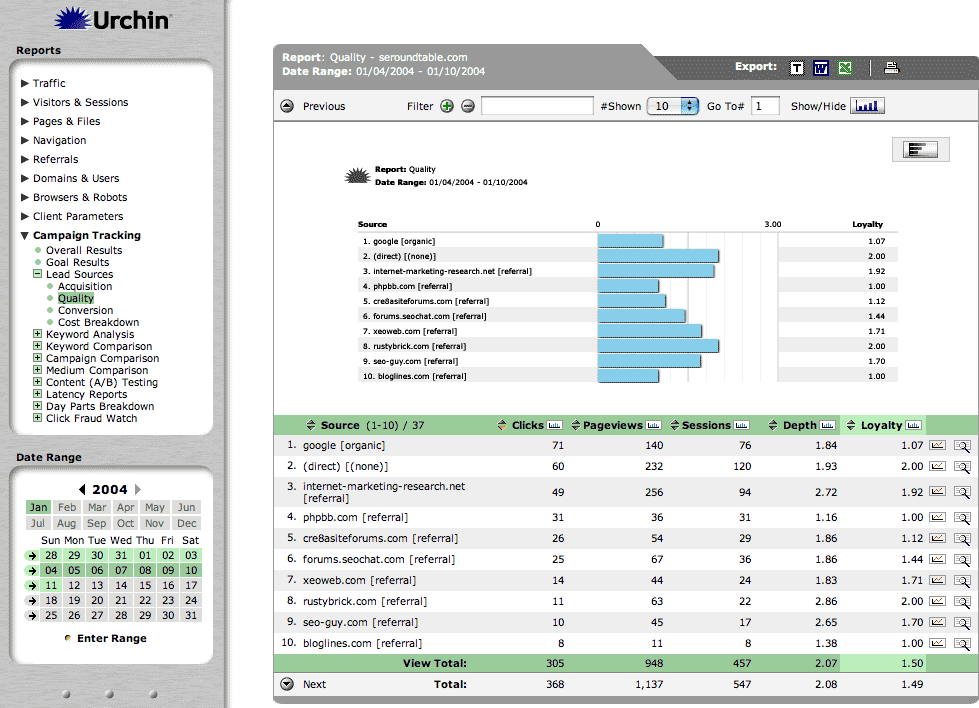
The "Quality" subsection details the information listed by Lead Source but provides clicks, pageviews, sessions, depth and a loyalty factor. Loyalty measures visitor interest by calculating the average number sessions per visitor (per click). The more visitors return to your site, the higher the loyalty factor. Loyalty is calculated as Sessions divided by Clicks. These figures demonstrate to you the quality of the lead sources.
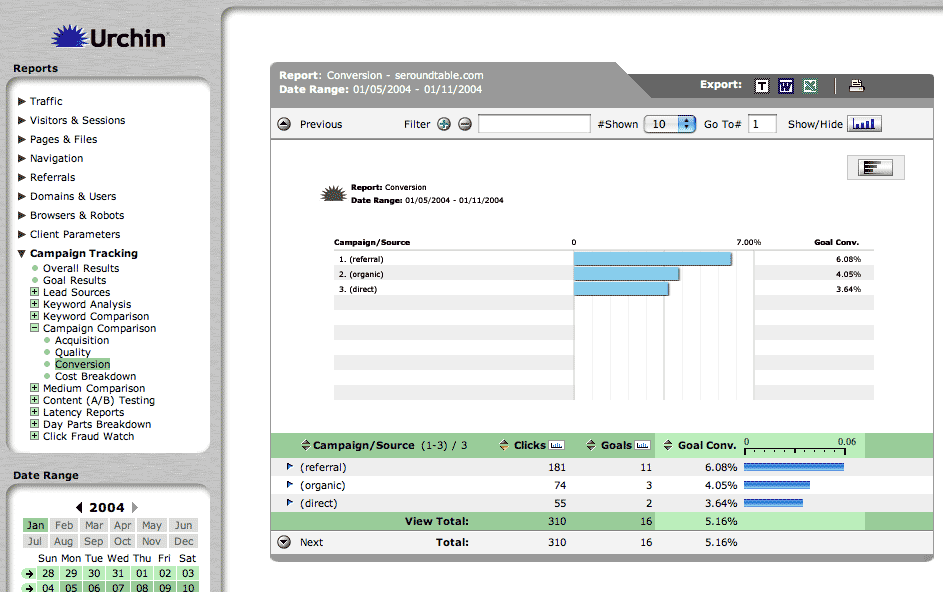
The "Conversion" subsection here shows the conversion in terms of goal conversions. By viewing this chart I can see that the Google organic Lead Source converts at 4.5% whereas the RustyBrick lead source has zero goal conversions. This information is used to see which Lead Sources you should allocate your marketing budget to. If the e-commerce module was turned on for this site, you would see transaction numbers and sales conversion percentages.

The last subsection "Cost Breakdown" does not have any information for a non-e-commerce site. If the e-commerce module were on, this section would enable you a look at the return on investment for those lead sources. The columns would contain the number of clicks, revenue, cost, ROI and average value, which is the average revenue per click and is calculated as Revenue divided by Clicks.
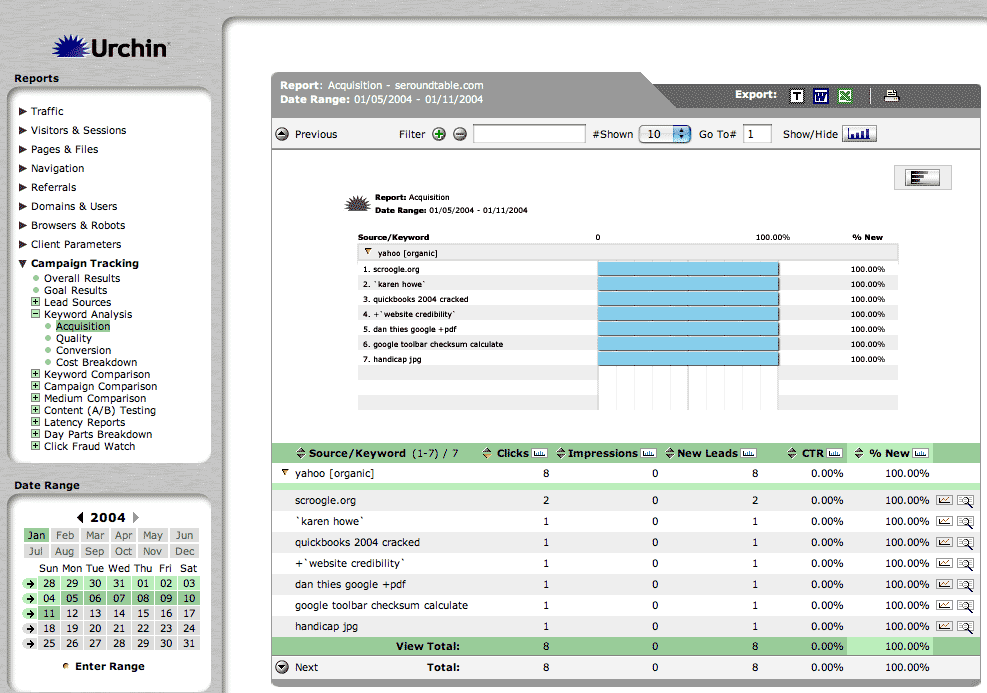
"Keyword Analysis" is the next main section within the "Campaign Tracking Module" and it gives you the data necessary to track your keyword success by search engine. In the example below displaying the acquisition, you can see Google provided 66 clicks whereas Yahoo provided only 8 clicks. Of the Google clicks, only 73% of those were new clicks whereas a 100% of Yahoo's clicks were unique.

You can then click on the arrow on the left side of the search engine and see which keywords drove the traffic to your site.
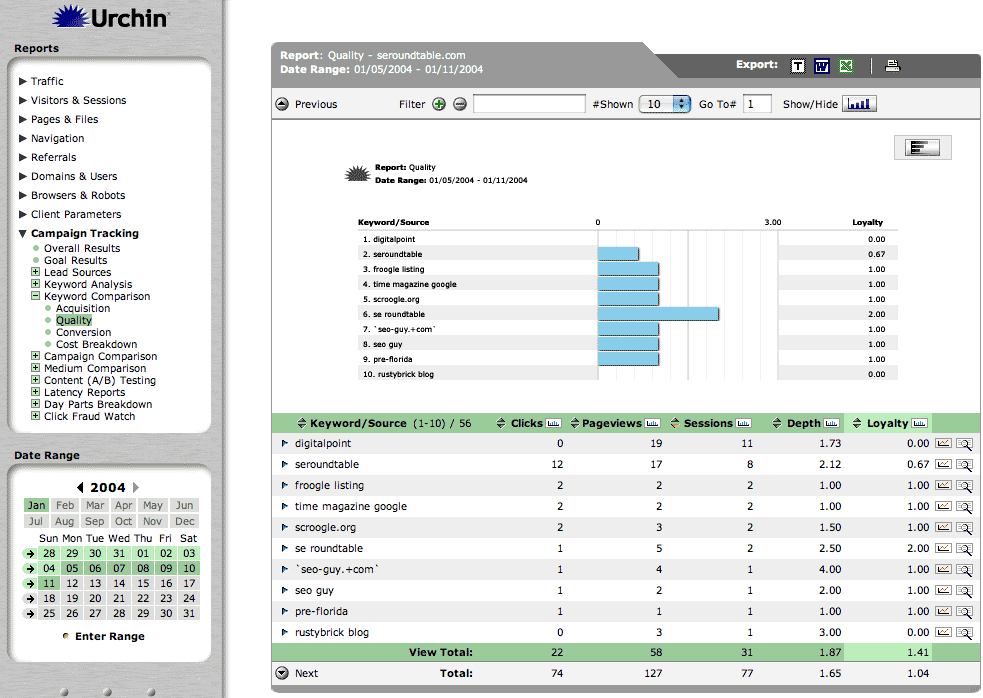
Skipping through some of the subsections of the screens, I will now show you an example of the keyword comparison charts. In the chart here, you will see the keywords within the quality view. The "Keyword Comparison" report gives you a picture of which keywords are driving traffic to your site. You can drill down on the keyword to see which search engines are providing that traffic. It basically gives you a different top level view then the previous "Keyword Analysis" report.
The "Campaign Comparison" gives you a break down of your campaigns and how each individual campaign is doing. In the example here, I have three campaigns, referral, organic and direct. I recently ran an advertisement for another site in an email newsletter. I was able, with Urchin, to track the number of click-throughs down to the goal completion and transaction level. This level of detail gives you the required data to make informed decisions on your Web sites marketing campaigns.
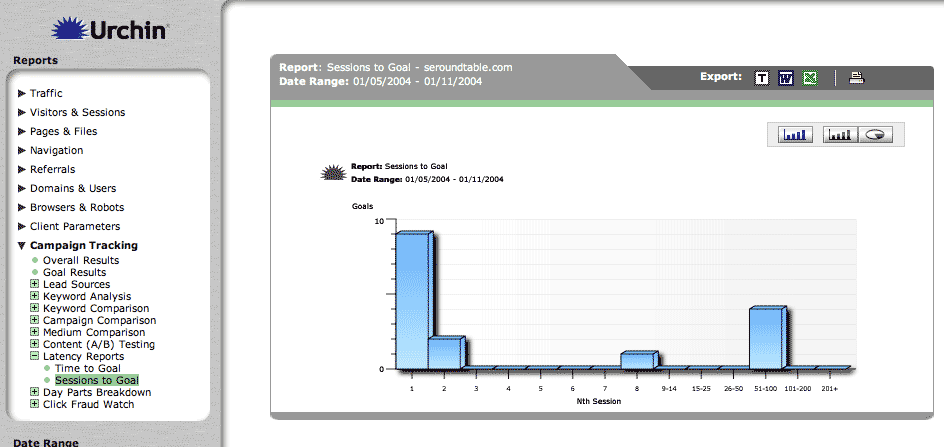
The final chart in this section is the "Latency" reports. This report gives you the ability to see how much time remains to reach a goal or how many sessions left to reach a goal. In the example below, I have selected the sessions to goal chart, which tells me the number of sessions an individual user takes to reach a single goal on the blog. If the e-commerce module were on, it would give you "time to transaction" and "sessions to transaction" information as well.
I would also like to mention that this is an extremely useful module, which gives you the ability to test certain campaigns with the "Content (A/B) Testing" section. For example this gives you the ability to see if text based ads work better or if graphical ads work better. In addition you can see "Click Fraud" reports and report those to your Pay Per Click providers and much more.
Urchin's Web analytics software is outstanding and extremely useful for analyzing a Web site's traffic patterns. However, there are a few items that can be improved or changed in order to make it easier to use and more valuable. Namely, the ability to use a dual wan connection (two Internet connections from two different ISPs over a load balanced router) without being kicked off for security reasons, the ability to track impressions of other campaigns including email or banner ads and not just Google AdWords and Overture campaigns, and to implement funnel based goal analysis metrics into the campaign tracking module would all be wonderful additions to Urchin's Web Analytics software.
The first difficulty I have while at work is that Urchin keeps on logging me out with the message "Session Error - Sorry, the IP address you are currently using does not match the one used at the initiation of the session. Please log-in again." This is partially my fault because I have a dual wan router that loads balances two different Internet connections. So my IP is constantly changing between the two IP addresses and if I click somewhere and my IP changes, Urchin boots me. I can set my router to just assign me one ISP connection but I rather not do that. I rather see Urchin add a preference to the configuration section of the system to set whether I want this security feature on or off. I should say that they do have solutions for this. If applicable, you can give a client a URL that they can access and the system won't log them out. There is nothing really easy to do to override this security feature.
The second difficulty came up when I wanted to test out the Content (A/B) Testing section of the Campaign Tracking Module. I sent out an email advertisement and wanted to not only track clicks and conversions based on those clicks but I also wanted to track impressions (views of the ads). I have submitted the request to Urchin and they said that you can currently import this data for Google, AdWords and Overture but they have not yet built in a mechanism to track this with any other campaign. They said it is a fault in the specification and that they are currently working on adding this feature. What we can expect is the ability to add a one by one transparent gif to the graphic ad and Urchin will see how many times that graphic is called and use that number for impressions. It can then provide other statistics such as CTR, or click through rates and more.
The final feature request would be something I call "Goal Based Funnel Analysis". I have decided to allocate a single section to this concept, so please read on.
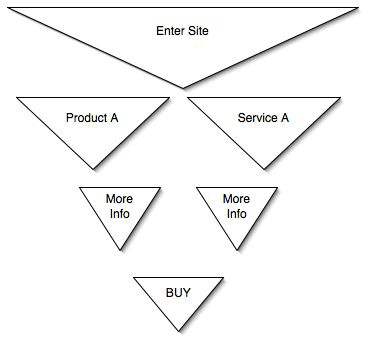
Goal Based Funnel Analysis is an extension of the current goal based analysis but adds another dimension to it. The ability to add multiple goals, which can currently be done by adding pipes (|) between the reporting setup, within the configuration section, would be a great improvement. It would allow you to track the linear or funnel flow of goal completion throughout your site. I think it would be even greater if somehow Urchin can specify the goals in priority order through the "funnel" and display it graphically in Urchin. A method of setting up a linear and possibly a tree-like structure for setting up goals and then tracking them would provide detail above any packaged reporting system I have ever seen. Keep in mind a funnel might split into sub-funnels.
This type of report is very important because it gives my clients the ability to see where on the site they are losing the customer. If they see 60% drop off after they add something to the cart, maybe they can add an incentive on that page to complete the order. The "click-to-and-from" report tells you the traffic patterns of your visitors but does not give you the ability to set up goals within those traffic patterns. You cannot see if goal completion throughout the stages of the funnel increase or decrease depending on the changes that you made to those pages.
Overall, Urchin's 5.5 Web Analytics Suite is an outstanding piece of software. The software enables you to track your success as a search engine marketer, beyond the detail of most other Web analytics software applications. The information and the manner Urchin presents the information gives you and your clients the ability to make informed decisions with their Web strategy. The graphs and user interface make for a an attractive, presentable and easy to use reporting tool.
With the 1st party cookie solution built in to the Urchin basic module, you can learn and track information that go beyond simple log files. In addition, with the E-Commerce Module and the Campaign Tracking Module, you can fine-tune each page to increase that individual page's success rate with ease. If Urchin can devise an easy way to deploy the concept of Goal Based Funnel Analysis, the Urchin application will be light-years beyond its competitors.

Barry Schwartz is the CEO of RustyBrick, a New York Web service firm specializing in customized online technology that helps companies decrease costs and increase sales. Barry is also the founder of the Search Engine Roundtable and the News Editor of Search Engine Land. He is well known & respected for his expertise in the search marketing industry. Barry graduated from the City University of New York and lives with his family in the NYC region.
This article is under Search Engine Optimization
There is 1 comment for this post
250 West Nyack Road, Suite #200 West Nyack, NY 10994
Get Directions
877-GO-RUSTY
877-467-8789
845-369-6869
845-228-8177
1 COMMENT