


Connect With Us
Visit Us
250 West Nyack Road, Suite #200 West Nyack, NY 10994
Get Directions
Call Us Toll Free
877-GO-RUSTY
877-467-8789
Telephone
845-369-6869
Fax
845-228-8177
Departments
Departments
Departments
SUBSCRIBE TO NEWSCONTACT US
 Version 4.3 of the iPhone Siddur was recently approved. I wanted to share with you the key new features in this version. Before doing so, here is the summary:
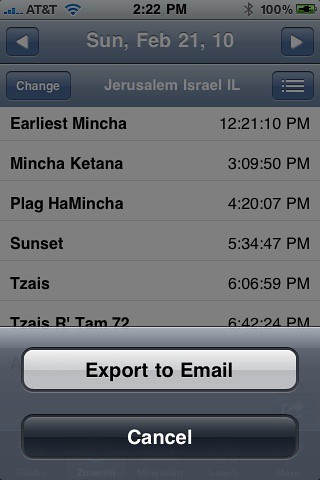
Let's start with exporting the Zmanim data to email. To do so, go to Zmanim, scroll down the Zmanim to the end and click on the little icon on the bottom right. Then select "Export to Email" and the contents of that page will be put into an email. You can select any stored location for any day and it will export the data to email.
Here are screen shots of that:

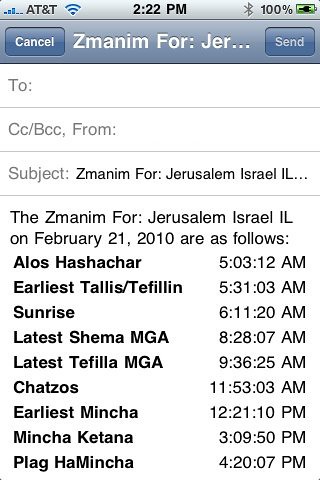
You are probably thinking, why the extra click to "export to email." Well, we have plans for more options there.
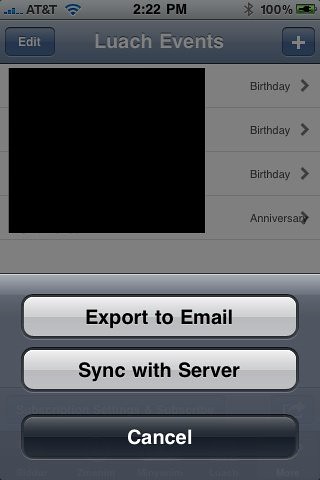
Next, we improved the issues with the Luach Events iPhone Calendar integration, plus we added an export to email feature. To activate the features, at the bottom right of the Luach Events section, there is that arrow again, click it and you can Export to Email or Sync with Server. Syncing with Server will push the changes to the server and update the iPhone Calendar iCal subscription - if you have that set up. It will also help us restore lost data, if you lose your iPhone or something else. Export to email, just does that. Here is a picture:
Finally, we somewhat cleaned up and clarified the iPhone Calendar subscription feature that pushes this data to your iPhone Calendar. We added the RustyBrick design and made it a two step process to clarify things:


Unfortunately, we still have to keep the iCal feature outside the app. Apple will not let us code it directly into the app. We hope they change their minds, but until then, this works.
What's next? Lots of stuff, so stay tuned...

Barry Schwartz is the CEO of RustyBrick, a New York Web service firm specializing in customized online technology that helps companies decrease costs and increase sales. Barry is also the founder of the Search Engine Roundtable and the News Editor of Search Engine Land. He is well known & respected for his expertise in the search marketing industry. Barry graduated from the City University of New York and lives with his family in the NYC region.
This article is under iPhone
There is 1 comment for this post
250 West Nyack Road, Suite #200 West Nyack, NY 10994
Get Directions
877-GO-RUSTY
877-467-8789
845-369-6869
845-228-8177
1 COMMENT