


Connect With Us
Visit Us
250 West Nyack Road, Suite #200 West Nyack, NY 10994
Get Directions
Call Us Toll Free
877-GO-RUSTY
877-467-8789
Telephone
845-369-6869
Fax
845-228-8177
Departments
Departments
Departments
SUBSCRIBE TO NEWSCONTACT US
Updated: Please see our new article on how this works over here.
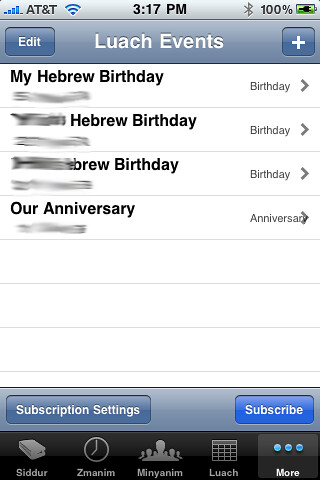
In version 4.0 of the iPhone Siddur we came up with a nifty way to allow people to pull the Luach (calendar events) portion of the Siddur directly into their iPhone calendar.
We noticed that when version 3.0 of the iPhone OS came out, I was able to email links to subscription calendars and they would dynamically show up in my iPhone's calendar. So I quickly subscribed to several web based subscription calendars to get myself in sync. I then thought, hey - can't we publish these iCal files (format for the subscription calendars that work in the iPhone) to the RustyBrick web server and allow people to subscribe to their iPhone Siddur Luach Events in that fashion? So Ronnie coded it and it worked. Apple approved this feature in version 4.0, but when we submitted version 4.1, they took notice to the feature and rejected the new version because of it. I'll discuss that a bit later, first things first.
How to Subscribe to your Luach Events on your Siddur:
You can always add/delete/edit your events and the iPhone Calendar will pick up on those changes. Every change pushes an update to our server and every time you load the iPhone Calendar, it looks for that file.
How Do I Delete the Subscription?
Like I said above, Apple approved this feature in version 4.0 but then rejected the feature in version 4.1. Why? Apple said that the application was accessing parts of the "iPhoneOS filesystem" and due to the iPhone Developer Program License Agreement in sections 3.3.4 which says "An Application may read data from or write data to an Application's designated container area on the device, except as otherwise specified by Apple," I cannot have this feature. Also iPhone Programming Guide States: "For security reasons, iPhone OS restricts an application (including its preferences and data) to a unique location in the file system. This restriction is part of the security feature known as the application's "sandbox." The sandbox is a set of fine-grained controls limiting an application's access to files, preferences, network resources, hardware, and so on."
Is it possible that Apple doesn't understand that this iCal subscription method does not write anything to the filesystem and does indeed work within the guidelines. All this does is host a file on an external web server and then allows people to access that file, like they would any subscribed calendar, in their iPhone. There is no voodoo here or direct access to the iPhone filesystem. It simply uses the iCal subscription model to give people a way to view (read only) the Luach events in the iPhone Siddur app, within their iPhone Calendar.
Honestly, I am surprised I have not seen more app using this method of viewing app calendar data in the native iPhone calendar.

Barry Schwartz is the CEO of RustyBrick, a New York Web service firm specializing in customized online technology that helps companies decrease costs and increase sales. Barry is also the founder of the Search Engine Roundtable and the News Editor of Search Engine Land. He is well known & respected for his expertise in the search marketing industry. Barry graduated from the City University of New York and lives with his family in the NYC region.
This article is under Apple, iPhone
There is 1 comment for this post
250 West Nyack Road, Suite #200 West Nyack, NY 10994
Get Directions
877-GO-RUSTY
877-467-8789
845-369-6869
845-228-8177
1 COMMENT